
Best Ways to Convert Large CSV Files to Invoices in 2026
If you're searching for the best ways to convert large CSV files to invoices, you're already ahead of the problem: 61% of late invoice payments in the U.S. are caused by simple invoicing errors, and most of those errors trace back to manual data entry from spreadsheets. Converting hundreds or thousands of CSV rows into professional, accurate invoices doesn't have to mean hours of copy-paste work. It means choosing the right method and letting automation handle the heavy lifting.
Try it on your next invoice
Draft from text or voice, edit every field, and export a PDF—free on the homepage.
Try AI invoiceKey Takeaways
| Question | Answer |
|---|---|
| What is the fastest way to convert a large CSV file to invoices? | Use a bulk invoice generator with CSV import and column mapping. You upload once, map your fields, and download a ZIP of PDFs in seconds. |
| Can I generate hundreds of invoices from one CSV file? | Yes. Batch PDF output tools process each CSV row as a separate invoice and bundle all completed PDFs into one ZIP file for download. |
| Is AI-driven invoicing more accurate than manual entry? | Significantly. Manual form filling carries a biological error floor of 1-4% per entry. AI-driven invoicing targets 99.9% accuracy based on your input data. |
| What file types work with a bulk invoice generator? | Most tools accept CSV and Excel. The generator maps your column headers (client name, line items, amounts, due date) to standard invoice fields. |
| How much does automated CSV-to-invoice conversion cost? | Plans vary. eInvoice Generator offers tiered pricing starting from free, with Professional and Business plans unlocking larger CSV batch sizes. |
| Do I need coding skills to convert CSV files to invoices? | No. Modern bulk invoice generators handle the mapping and generation visually. You drag, drop, map columns, and download. |
| Can I bill multiple clients from one CSV file? | Yes. Multi-client invoicing tools let you process one business profile against many client rows in a single session. |
Why Converting Large CSV Files to Invoices the Right Way Actually Matters
Manual form filling isn't a minor inconvenience. When you're working with hundreds of rows of billing data, every manual keystroke multiplies your risk of error and slows down your cash flow cycle.
Think about it this way: a business processing 500 invoices per month manually is burning time on every single field. Client name, address, line items, tax rate, due date. Across 500 records, that's thousands of individual inputs where a typo can delay payment by weeks.
Issuing invoices faster, immediately after work is completed, is one of the most direct levers a small business controls. CSV conversion is where that speed lives. Your data is already structured. The right tool turns that structure into professional PDFs without manual re-entry.
Best Ways to Convert Large CSV Files to Invoices: A Method-by-Method Breakdown
Not every approach fits every business. Here are the primary methods in 2026, ranked by speed, accuracy, and scalability.
1. Bulk Invoice Generator with CSV Import (Best for High Volume)
This is the most direct answer if you're converting large CSV files to invoices regularly. Upload your CSV or Excel file. Map your columns to invoice fields (client name, amount, line items, tax, due date). The tool generates every invoice simultaneously, then packages your completed PDFs as a single ZIP file, ready to distribute.
The bulk invoice generator at eInvoice Generator does exactly this. Progress tracking shows you where the batch stands. When it's done, one click downloads the full ZIP. No manual form filling. No repeated data entry.
This method scales. Whether you have 50 rows or 5,000, the workflow is identical.
2. Multi-Client Invoicing Session (Best for Recurring Client Rosters)
If your CSV contains billing data for many different clients you bill regularly, a multi-client invoicing workflow fits well. One business profile. Many clients. You switch between clients, reuse line items where they repeat, and download a professional PDF for each bill without rebuilding your invoice from scratch each time.
This approach works especially well for agencies, consultancies, and service businesses with stable client rosters billed on different terms.
3. AI-Driven Invoicing with OCR Scanning (Best for Mixed Input Sources)
Sometimes your data doesn't start as a clean CSV. It starts as scanned receipts, supplier invoices, or PDFs. Invoice OCR processing uses AI to extract vendor names, dates, line items, and totals from uploaded images or PDFs, converting them into an editable draft. You review, adjust, and export your own professional PDF.
This is particularly useful when you're consolidating billing data from multiple sources before it becomes a clean CSV.
4. Bulk Invoice Generator with Templates (Best for One-Off Bulk Prep)
For smaller batches or one-off needs, a invoice generator with customizable templates gets the job done quickly. You build one invoice at a time, but the template structure and pre-filled business details cut the time per invoice significantly.
This isn't the right tool for converting thousands of CSV rows. But for 10-20 invoices where each needs individual attention, it's clean and fast.
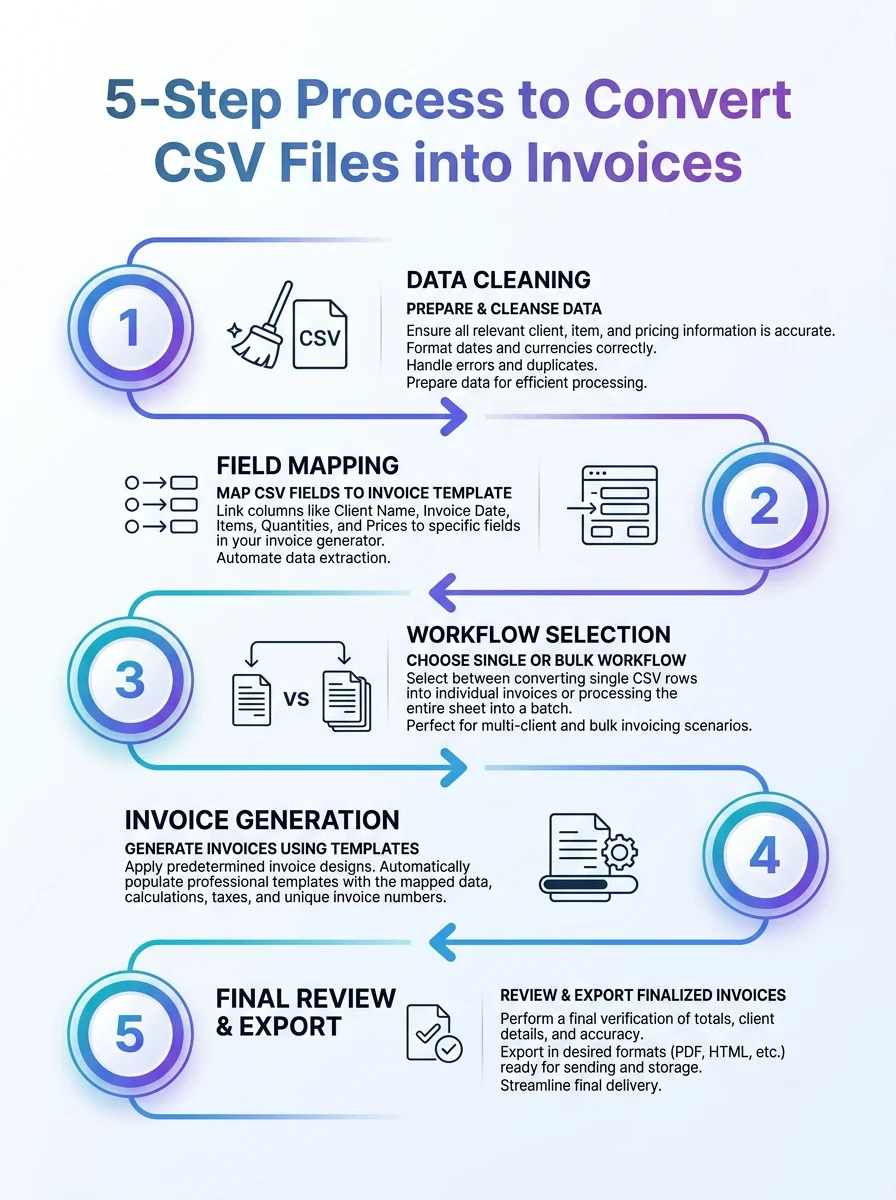 A visual guide outlining a five-step method to turn large CSV files into invoices. This infographic summarizes the workflow.
Step-by-Step: How to Convert a Large CSV File to Invoices Using a Bulk Generator
Here's the exact workflow for the fastest method available in 2026.
- Prepare your CSV file. Make sure your column headers are clear: client name, client email, address, line item descriptions, quantities, unit prices, tax rate, and due date. Clean data in means clean invoices out. We already provide a custom CSV template that you can fill and upload back to our system.
- Upload your CSV or Excel file. Drop it into the bulk generator. The tool reads your headers automatically.
- Map your columns. Match each column in your file to the corresponding invoice field. Most tools suggest mappings based on header names.
- Set your invoice template and branding. Choose your template, add your business logo, and set payment terms. This applies to every invoice in the batch.
- Run the batch. Click generate. The tool processes each row as a separate invoice simultaneously. Watch the progress tracker.
- Download your ZIP file. Your completed PDFs arrive as a single ZIP file, ready to distribute. Email them, upload them to your accounting platform, or archive them directly.
That's the entire process. No manual form filling. No repeated copy-paste. No reformatting each invoice by hand.
Did You Know?
Manual invoice processing costs an average of $12.88 to $19.83 per invoice, compared to just $1.77 to $3.18 for automated systems.
Source: Gennai Blog 2026
What Makes a Good CSV Structure for Bulk Invoice Conversion
The quality of your output depends directly on the quality of your input. Bad CSV structure is the most common reason bulk invoice generation produces errors or incomplete PDFs.
Follow these rules for a clean CSV file before you upload:
- One row per invoice. Each client or billing instance should occupy its own row. Don't merge cells or span data across rows.
- Consistent column naming. Use clear, consistent headers. "Client Name" reads better than "CN" or "cname" when mapping.
- Separate line items clearly. If you have multiple line items per invoice, use dedicated columns (Item1, Qty1, Price1, Item2, Qty2, Price2) or check whether your tool supports comma-separated line items within a single cell.
- Include all tax and discount fields. Missing tax rates are a common source of invoicing errors downstream. Add them to your CSV before upload, not after.
- Format dates consistently. Use one date format throughout (YYYY-MM-DD is safest). Mixed formats cause parsing errors.
- Remove blank rows. Empty rows get processed as empty invoices. Clean them out before upload.
Five minutes of CSV prep saves you an hour of invoice corrections.
Accuracy: Why the Best Ways to Convert Large CSV Files to Invoices Prioritize 99.9% Data Accuracy
Accuracy isn't a nice-to-have. It's what determines whether you actually get paid, and when.
Human data entry has a biological error floor of 1% under ideal conditions, climbing to 4% under typical fatigue and time pressure. On a 1,000-row CSV, that's up to 40 mistakes. Each one is a potential payment delay, a dispute, or a client relationship problem.
AI-driven invoicing targets 99.9% accuracy based on your input data. The system doesn't get tired. It doesn't misread a number at row 847 because it's been entering data for three hours. It maps your CSV fields to invoice fields the same way on row 1 as it does on row 1,000.
That consistency is the core business case for converting large CSV files to invoices with automation rather than manual entry.
Industry-Specific Templates: Match Your Invoice Format to Your Billing Type
Knowing how to create an invoice correctly is one of the most practical skills any freelancer, small business owner, or growing team can have. The format matters.
A contractor invoicing for labor hours needs different fields than a consultant billing per project or a property manager invoicing monthly fees. When you convert large CSV files to invoices in bulk, the template you apply to your batch shapes every PDF in it.
Here's a quick reference for common billing types:
| Business Type | Key Invoice Fields | Template |
|---|---|---|
| Contractor | Labor hours, materials, project phases | Contractor Invoice Template |
| Freelancer | Task descriptions, hourly or flat rate, branding | Freelance Invoice Template |
| Consultant | Hourly rate, project milestones, retainer terms | Consulting Invoice Template |
| Construction | Job codes, subcontractor costs, progress billing | Construction Templates |
| Transportation | Route details, mileage, load reference numbers | Transportation Templates |
Applying the right template to your bulk CSV run means every invoice in your ZIP file looks exactly right for your industry, not like a generic bill.
Pricing: What to Expect When You Choose a CSV-to-Invoice Tool in 2026
The fastest option in 2026 is an AI-assisted tool with a live preview. But cost matters when you're running high-volume billing operations.
eInvoice Generator structures its plans around your batch size and invoicing needs:
- Free plan: Suitable for small batches and getting started with CSV mapping.
- Professional plan ($4.99): Larger CSV import limits, batch PDF output, and priority generation.
- Business plan ($9.99): Full bulk invoice generator access, maximum CSV row capacity, and ZIP download at scale.
Check the full breakdown on the pricing page to match your monthly invoice volume to the right plan.
Compare that to manual processing costs. If your team is manually converting CSV data to invoices, you're spending $12 to $20 per invoice in labor. A 200-invoice month manually costs over $2,500 in staff time. Automated batch processing at $9.99 per month changes that math completely.
Did You Know?
Automating usage-based billing from CSV files can reduce the billing workload by up to 90%.
Source: LedgerUp 2026
Best Ways to Convert Large CSV Files to Invoices: Common Mistakes to Avoid
Even with the right tool, these mistakes slow down or break your CSV-to-invoice workflow.
- Skipping the column mapping review. Auto-mapping is fast, but always verify that "Amount" mapped to the right field and not to a tax column.
- Using inconsistent client name formats. "Acme Corp," "ACME CORP," and "Acme Corporation" will generate three separate client entries. Standardize before upload.
- Ignoring currency formatting. Mix of "$1,200" and "1200" in the same column causes parsing errors. Strip formatting from your CSV and let the tool apply it.
- Forgetting to set payment terms globally. If your batch template doesn't include default payment terms, individual invoices will go out without due dates.
- Processing without a test run. Upload 5 rows first. Review the PDF output. Then run the full batch. Catching a mapping error on row 3 is far easier than correcting 500 completed invoices.
Billing Workflows That Benefit Most From CSV-to-Invoice Conversion
Not every business generates invoices from a spreadsheet. But for those that do, the productivity gain from bulk conversion is significant.
These are the billing workflows where converting large CSV files to invoices delivers the most direct value:
- Usage-based billing: SaaS, utilities, and platform businesses where each client's bill depends on metered data recorded in a CSV each billing cycle.
- Project-end billing: Agencies and construction firms that accumulate time and material costs in a spreadsheet throughout a project, then invoice at completion.
- Recurring service billing: Property managers, subscription service providers, and maintenance companies billing the same client list each month with minor variations.
- Marketplace payouts and commissions: Platforms paying out or invoicing sellers, agents, or affiliates based on performance data exported from their system as a CSV.
- Accounting period close: Finance teams that consolidate billing data at month-end and need to issue a full batch of invoices simultaneously before the period closes.
In each case, the data already exists in structured form. The only question is how quickly and accurately you can convert it into professional, sendable invoices.
The Best Ways to Convert Large CSV Files to Invoices Come Down to One Decision
Manual form filling or automated batch generation. That's the decision. The best ways to convert large CSV files to invoices in 2026 all point toward automation, and the bulk invoice generator approach delivers the highest speed and lowest error rate for any volume above a handful of records.
All invoices are generated with 99.9% accuracy based on your input data. Your completed PDFs arrive as a single ZIP file, ready to distribute. Your billing cycle shortens. Your error rate drops. Your cash flow improves.
Upload your CSV. Map your columns. Download your ZIP. That's the workflow. If you find an updated or conflicting primary source, contact us and we verify and update within 30 days.
Start with the bulk invoice generator if you're working with high-volume CSV data, or explore the full eInvoice Generator platform to match your workflow to the right tool.
Frequently Asked Questions
What is the best way to convert a large CSV file to invoices automatically?
The best way to convert large CSV files to invoices automatically is a bulk invoice generator with CSV import and column mapping. You upload your file, map column headers to invoice fields (client name, line items, amounts, tax, due date), and the tool generates all invoices simultaneously, delivering a ZIP of PDFs for download.
How do I convert hundreds of CSV rows into PDF invoices at once?
Upload your CSV to a batch PDF output tool, map your data columns to the corresponding invoice fields, apply your business template and branding, then run the batch. The completed PDFs are packaged into a single ZIP file you download in one click. No manual form filling required for any individual invoice.
Is converting CSV files to invoices in bulk accurate enough for real business use?
Yes. AI-driven invoicing tools target 99.9% accuracy based on your input data, which is significantly more reliable than manual entry (which carries a 1-4% error rate under typical working conditions). The key is clean CSV preparation before upload: consistent formatting, no blank rows, and clear column headers.
Can I bill multiple different clients from one CSV file?
Absolutely. Each row in your CSV represents one invoice, and each row can contain a different client's details. The bulk generator creates a separate, individually addressed PDF for every row, then bundles them all into one ZIP download. Multi-client invoicing from a single CSV file is the primary use case these tools are built for.
What should my CSV file include before uploading to an invoice generator?
Your CSV should include at minimum: client name, client address, line item descriptions, quantities, unit prices, tax rate, and due date. Each row should represent one complete invoice, with consistent formatting throughout (no merged cells, no mixed date formats, no blank rows).
How much does it cost to convert large CSV files to invoices using an automated tool in 2026?
Pricing depends on your batch size and plan. eInvoice Generator offers plans starting from free, with Professional and Business tiers unlocking larger CSV import limits and full batch PDF output. Compare that cost to manual processing, which averages $12.88 to $19.83 per invoice in labor, and automation pays for itself quickly at any significant volume.
Is there a free way to convert CSV files to invoices for small batches?
Yes. eInvoice Generator includes a free plan suitable for smaller CSV batches. For higher volumes and faster turnaround with full ZIP download capability, a paid plan fits better. If you're only issuing a handful of invoices occasionally, the single invoice generator with templates is a straightforward starting point.
Ready to create your next invoice?
Use AI drafting on the homepage or sign up for a free account with cloud save and monthly plan limits.
Related articles
When to Switch to Bulk CSV Invoicing (Signs You've Outgrown One-by-One)
If you bill the same service to dozens of clients monthly, manual invoices waste hours. Here's when bulk CSV and multi-client tools pay off.
We'are Listed on
How to Invoice as a Freelance Writer: What to Include and How to Bill for Writing Projects
Discover essential tips on invoicing as a freelance writer. Learn what to include and how to effectively bill for your writing projects.
Digital Payment Statistics (2026): 65+ Data Points on Market Size, Wallets, BNPL, and the Future of Money
Explore the latest digital payment statistics for 2026, featuring 65+ data points on market size, wallets, BNPL, and the evolving future of money