
How to Choose Reliable Invoicing Software for Beginners: A Complete 2026 Guide
If you're just starting out and trying to figure out how to choose reliable invoicing software for beginners, here's the number that should settle the debate fast: 85% of freelancers experience late payments at least some of the time, with 21% being paid late or not at all more than half the time. Whether you are a freelancer, contractor, or small business owner, this guide will help you get paid faster and look more professional.
Try it on your next invoice
Draft from text or voice, edit every field, and export a PDF—free on the homepage.
Try AI invoiceKey Takeaways
| Question | Answer |
|---|---|
| What is the most important feature for beginners? | A plain-English input system that creates professional PDF invoices without manual data entry or complex configuration. |
| Do I need to create an account to use invoicing software? | Not always. Tools like eInvoice Generator let you generate and download invoices with no registration required. |
| How much does reliable invoicing software cost for beginners? | You can start free. Paid plans typically run $14.99/month (Professional) or $29.99/month (Business) for advanced features like cloud storage and bulk billing. |
| What is AI invoicing and does a beginner need it? | AI invoicing uses Smart Fill technology to convert plain-English text or voice input into structured invoice fields. Yes, beginners benefit most because there is nothing to configure from scratch. |
| Can invoicing software handle multiple clients at once? | Yes. Platforms with multi-client invoicing dashboards let you manage several billing relationships without starting from zero each time. |
| Is bulk invoicing relevant for beginners? | It becomes relevant faster than most beginners expect. Converting CSV rows into invoices in minutes saves hours of copy-paste work the moment your client list grows. |
| Where can I learn invoicing best practices? | The eInvoice invoicing guide covers everything from what an invoice is to how to send it and get paid faster. |
Why Beginners Need Reliable Invoicing Software (Not Just Any Tool)
Manual invoicing is not just an inconvenience. It is a direct financial leak.
Full AI-powered automation now reduces the cost of processing a single invoice from $12.88–$19.83 down to under $1, and if you're still running manual invoicing workflows, that gap is coming directly out of your margin.
For beginners, the cost calculation is even simpler. You are trading your own time, and time is the one resource you cannot buy back at the start of a business.
Choosing reliable invoicing software early locks in professional habits before bad ones form. It means your cash flow is protected by systems, not by memory.
Did You Know?
Nearly 39% of all manually processed invoices contain at least one error — errors that lead to disputes, payment delays, and cash flow problems.
Source: Gennai Blog (March 2026)
That is not a rounding error. That is 4 out of every 10 invoices coming back with a problem attached. Software eliminates the manual data entry step that causes most of those mistakes.
What to Look for When Choosing Invoicing Software for Beginners
The features that matter most for beginners are different from what an enterprise accounting team needs. Focus on these criteria when evaluating your options.
1. Plain-English Input (Smart Fill Technology)
The best invoicing tools for beginners do not require you to hunt down fields or configure templates from scratch. Smart Fill technology lets you type client details, services or products, rates, and due terms in plain English. The AI structures the data and outputs a professional PDF.
No templates to configure from scratch. No fields to hunt down. Just plain English input and a professional PDF output.
2. Zero-Login Access
Account creation is friction. For a beginner sending their first invoice under pressure, the last thing you need is an email verification loop.
Look for tools where no registration required is a real policy, not a marketing footnote. You should be able to go from prompt to PDF on your first visit.
3. Live Preview
You stay in control of every field before the invoice goes out. A live preview pane shows you exactly what the client will receive, in real time, before you download or send anything.
4. Mobile-Friendly Input
If you're on mobile between client calls, you can dictate the invoice details and the AI handles the rest. Voice-to-invoice capability is not a luxury feature. It is a practical time-saver for anyone running a solo operation.
5. Scalability Without Switching Costs
Choose software that grows with you. The tool you use for your first invoice should still work when you have 50 clients. Bulk invoicing from CSV uploads, multi-client dashboards, and API access for automation are the features that tell you a platform is built to scale.
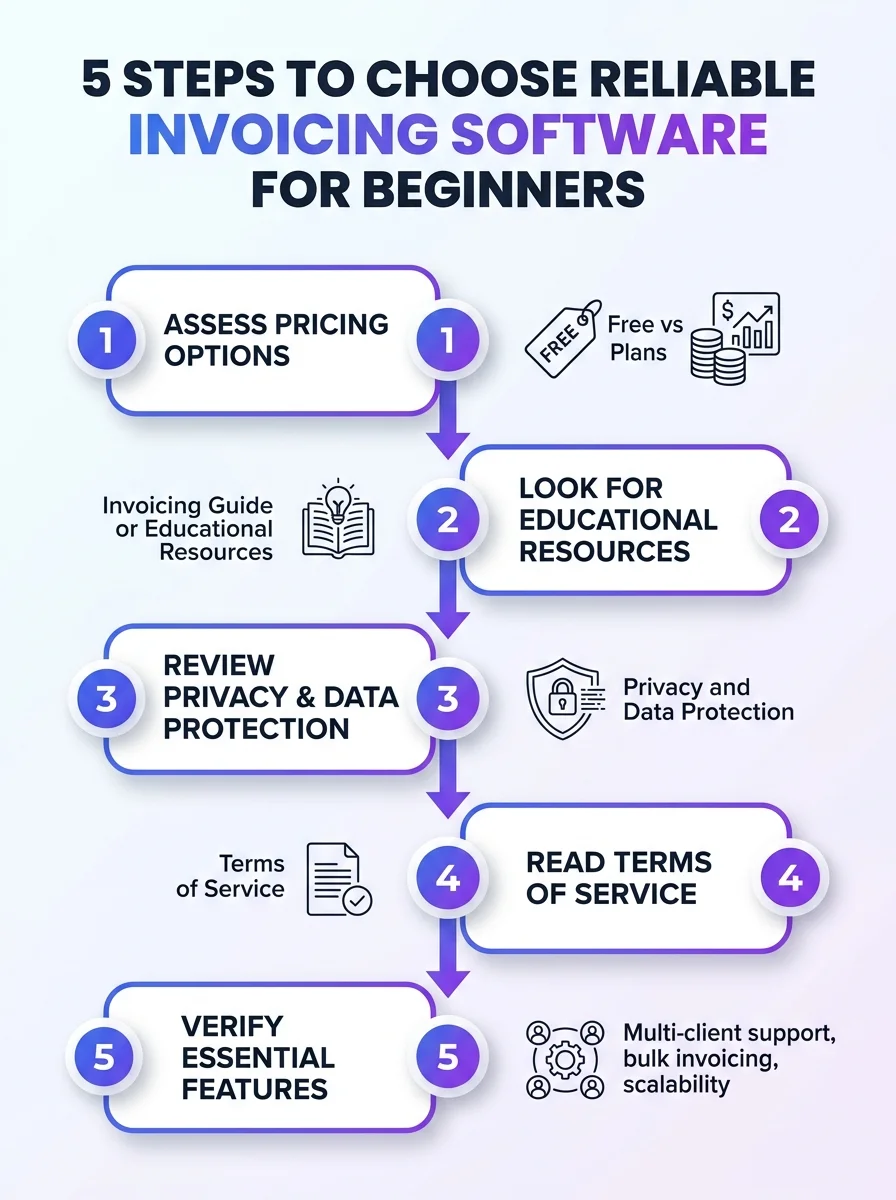
A quick visual guide with five steps to help beginners choose reliable invoicing software. It highlights criteria, features, and cost considerations.
Best for Freelancers: How to Choose Invoicing Software That Protects Your Income
Freelancers face a specific cash flow problem. You deliver the work. Then you wait. The right invoicing software shortens that wait by removing every friction point between "job done" and "payment received."
When choosing reliable invoicing software as a freelancer in 2026, prioritize these workflow features:
- Automated due date enforcement: The software should make late payment visible to the client immediately, not after you follow up manually.
- WhatsApp and email sharing: The faster the invoice reaches the client, the faster the clock starts on the payment window.
- Professional PDF output: A polished, professional PDF signals legitimacy. Clients pay faster when the invoice looks like it came from a real business operation.
- Voice-to-invoice: Between client calls, on a job site, or in a car — you should be able to create an invoice in under two minutes without sitting at a desk.
The whole cycle runs in under two minutes. That is the benchmark for reliable invoicing software built for freelancers.
Master the art of invoicing and get paid faster by eliminating every manual step between you and a sent invoice.
Best for Small Business Owners: Choosing Invoicing Software That Scales with Volume
Small business owners hit a wall fast when their invoicing workflow is manual. One client is manageable. Ten is tedious. A hundred requires a system.
Converting hundreds or thousands of CSV rows into professional, accurate invoices doesn't have to mean hours of copy-paste work. The bulk invoicing generator processes entire spreadsheets into formatted, ready-to-send invoices in a single upload.
Here is what a reliable small business invoicing workflow looks like in practice:
- Upload your client CSV from your CRM or spreadsheet.
- Map the columns (name, service, rate, due date) once.
- Download or send all invoices in batch.
No repeated manual entry. No errors compounding across rows. No overhead from an accounts payable team you cannot yet afford.
29% of business leaders report their teams spend 31+ hours per month on manual invoicing, payment entry, and collections. That is nearly a full work week every month redirected away from growth. Choose software that eliminates that entirely.
Best for Budget-Conscious Beginners: Free vs. Paid Invoicing Software in 2026
Cost is a real concern when you are just starting out. Here is a transparent breakdown of what reliable invoicing software actually costs, and what you get at each tier.
| Plan | Price | Best For | Key Features |
|---|---|---|---|
| Free | $0 | First-time users, occasional invoicers | Unlimited guest PDFs, up to 10 saved invoices, no signup required |
| Professional | $14.99/mo | Freelancers and growing solo operators | Cloud storage, full dashboard, WhatsApp sharing, bulk billing tools |
| Business | $29.99/mo | Agencies and businesses invoicing at volume | Unlimited invoices, API access, full automation support |
The free plan is a real starting point, not a limited demo. You can generate and download professional invoices immediately, with no registration required, and no credit card attached.
When you hit 10 saved invoices or need cloud access and WhatsApp delivery, the Professional plan at $14.99/month covers it. See the full breakdown at the eInvoice pricing page.
Best for Speed: How to Choose Invoicing Software with AI Automation
Speed is not just a convenience metric. Every day between "invoice sent" and "payment received" is a day your cash flow is compressed.
Create professional invoices with AI that drafts from text or voice. The Smart Fill system reads your plain-language input, identifies the client name, service items, quantities, rates, and payment terms, then populates a structured invoice form automatically.
Here is how the workflow runs from start to professional PDF:
- Open the generator. No login page, no account creation screen.
- Type or speak your invoice details in plain English.
- Review the live preview. You stay in control of every field before the invoice goes out.
- Download the professional PDF or share it directly via WhatsApp or email.
The whole cycle runs in under two minutes.
For beginners choosing reliable invoicing software in 2026, this kind of frictionless workflow is not a premium feature. It is the baseline you should expect.
Did You Know?
Small businesses using automated invoicing collect payments an average of 8 days faster than those using manual processes.
Source: US Tech Automations (April 2026)
Eight days faster. If you are invoicing at $5,000/month, that is real cash sitting in your account instead of in someone else's accounts payable queue.
How to Choose Invoicing Software with OCR and Bulk Capabilities
Two features separate beginner-level tools from tools that actually scale: OCR scanning and bulk invoicing.
OCR Scanning
OCR (Optical Character Recognition) lets you photograph or upload a document and have the software extract the relevant data automatically. For beginners receiving paper purchase orders or working from scanned contracts, this eliminates the manual data entry that causes most billing errors.
68% of finance teams still manually key invoice data into their systems, despite the availability of AI capture tools. Choosing software with OCR gives you an immediate efficiency advantage over nearly 70% of competitors still doing it by hand.
Bulk Billing from CSV
Converting hundreds or thousands of CSV rows into professional, accurate invoices doesn't have to mean hours of copy-paste work. The bulk invoice generation tool is built exactly for this: upload once, generate at scale.
This matters for beginners because growth happens faster than expected. Building bulk billing into your invoicing workflow from day one means you never hit a ceiling where your billing operation becomes a bottleneck on new revenue.
Best for Managing Multiple Clients: What to Look for in Your Invoicing Dashboard
Multi-client management is where most beginner invoicing setups break down. Tracking who was invoiced, what they owe, and what is overdue across five or more clients manually is where errors compound and payments fall through cracks.
When choosing reliable invoicing software for beginners who bill more than a handful of clients, look for a dedicated multi-client dashboard. This should show you:
- All active clients in a single view
- Invoice status per client (sent, viewed, overdue, paid)
- Per-client billing history without digging through folders
- The ability to clone or repeat an invoice for recurring work
The multi-client invoicing dashboard is built for exactly this scenario: agencies and freelancers billing multiple clients without the overhead of enterprise accounting software.
You get visibility. You get speed. And you get professional PDF output for every client without configuring a new template each time.
Common Mistakes Beginners Make When Choosing Invoicing Software
Knowing what to look for is only half the picture. These are the mistakes that cost beginners time and money.
- Choosing by feature count instead of workflow fit: A tool with 200 features you will never use is overhead, not value. Start with what you actually need: fast input, professional PDF output, and reliable delivery.
- Ignoring mobile usability: If the software is not usable from a phone, you will skip invoices when you are out of the office. Every skipped invoice is a delayed payment.
- Waiting to upgrade until it hurts: The right time to move from a free plan to a paid plan is before you hit the limit, not after you have lost track of five invoices.
- Overlooking data security: Your invoices contain client names, business addresses, banking references, and service records. Review the privacy policy of any tool before you start uploading sensitive data.
- Choosing software that requires manual data entry at every step: If you are typing the same client details repeatedly, the tool is not saving you time. Look for Smart Fill and client record storage.
Have questions the tool's own documentation does not answer? The eInvoice FAQ covers the most common questions about features, pricing, and how the platform handles data.
How to Choose Reliable Invoicing Software for Beginners in 2026
The decision of how to choose reliable invoicing software for beginners comes down to one core question: does this tool remove work from your plate, or does it just move the work somewhere else?
Reliable invoicing software in 2026 means AI-powered Smart Fill, voice-to-invoice capability, OCR scanning, no registration required, live preview before every send, and a clear upgrade path from free to professional to business as your volume grows.
The cost gap between manual invoicing workflows and automated ones is not theoretical. It is $12.88–$19.83 per invoice on the manual side versus under $1 on the automated side. At any real billing volume, that gap is significant overhead that comes directly out of your margin.
Start free, build the habit, and scale the tool as your client list grows. That is the formula. Everything else is a configuration detail.
Frequently Asked Questions
What is the easiest invoicing software for someone just starting out?
The easiest invoicing software for beginners is one that requires no registration, accepts plain-English input, and outputs a professional PDF in under two minutes. AI-powered tools with Smart Fill technology handle the structure for you, so there is nothing to configure before you send your first invoice.
How do I choose reliable invoicing software for beginners without paying for features I don't need?
Start with a free plan that covers basic PDF generation and a small number of saved invoices. Only upgrade to a paid tier (typically around $14.99/month) when you need cloud storage, bulk billing, or multi-client dashboard features. Choosing software that lets you start free with a clear, transparent upgrade path keeps your overhead low while the business grows.
Is free invoicing software reliable enough for a small business in 2026?
For occasional invoicing or getting started, free invoicing software is genuinely reliable if it uses AI generation and outputs professional PDFs with correct calculations. The limitation is typically volume (number of saved invoices) and collaboration features, not accuracy or professionalism of the output itself.
What invoicing software features actually help beginners get paid faster?
The features with the most direct impact on payment speed are fast invoice creation (voice or text input), direct delivery via WhatsApp or email from inside the tool, and clear payment terms printed on every invoice. Small businesses using automated invoicing collect payments an average of 8 days faster than those using manual processes, which is a meaningful cash flow difference at any billing volume.
Do I need accounting software or just invoicing software as a beginner?
Most beginners do not need full accounting software at the start. Invoicing software handles the client-facing billing workflow: creating, sending, and tracking invoices. Full accounting platforms add expense tracking, tax reconciliation, and financial reporting, which adds complexity and cost before it adds value for most solo operators and early-stage businesses.
What should I look for in invoicing software if I bill multiple clients at once?
Look for a dedicated multi-client dashboard that shows invoice status across all active clients in a single view, plus bulk billing tools that let you generate multiple invoices from a CSV upload. These two features together eliminate the manual overhead that scales linearly with your client count when you are managing it all by hand.
Is AI invoicing software safe to use with real client data?
Reputable AI invoicing platforms publish a clear privacy policy detailing how client data is stored, whether it is retained after a session, and what encryption standards apply. Always review the platform's privacy policy before entering real client names, addresses, or payment details, and choose tools that are explicit about data handling practices.
Ready to create your next invoice?
Use AI drafting on the homepage or sign up for a free account with cloud save and monthly plan limits.
Related articles
How QR Code Payments Are Bypassing Traditional Banking Delays in 2026
Discover how QR code payments are revolutionizing transactions in 2026, eliminating traditional banking delays and enhancing financial efficiency.
Professional Branding and Invoice Design Psychology: Why the Way You Bill Clients Determines Whether You Get Paid
Discover how professional branding and invoice design impact client payments. Learn the psychology behind effective billing to enhance your cash flow.
What Should an Invoice Include? The 12 Fields That Matter
Discover the essential 12 fields your invoice must include to ensure clarity and professionalism. Learn how to create effective invoices today.
How to Send an Invoice: Email, WhatsApp, and Link-Sharing Explained for 2026
Learn the best practices for sending invoices in 2026. From email to WhatsApp and link-sharing, find out how to adapt to client preferences for quicker payments.