
What Should an Invoice Include? The 12 Fields That Matter
Knowing what should an invoice include sounds simple, but 39% of all invoices contain at least one error, such as missing information or incorrect data entry. That single stat explains why so many payments get delayed, disputed, or rejected outright. Get all 12 fields right every time, and you get paid faster. Miss even one, and you're chasing the client for a corrected document.
Try it on your next invoice
Draft from text or voice, edit every field, and export a PDF—free on the homepage.
Try AI invoiceKey Takeaways
| Question | Quick Answer |
|---|---|
| What are the most important fields on an invoice? | Invoice number, dates, seller info, buyer info, itemized services, subtotal, tax, and total are non-negotiable. |
| Do all invoices need a tax field? | Yes, even if the rate is 0%. A blank tax line signals an oversight; an explicit 0% signals intentional compliance. |
| What should an invoice include for payment terms? | A clear due date, accepted payment methods, and any late fee policy. See our payment terms guide for templates. |
| How do I number invoices correctly? | Use a sequential, unique identifier (e.g., INV-2026-001). Never reuse numbers; duplicates cause accounting chaos. |
| Can I create a compliant invoice for free? | Yes. Our free invoice generator lets you build and download a professional PDF with all 12 fields, no sign-up required. |
| Is an invoice the same as a receipt? | No. An invoice requests payment; a receipt confirms it. Learn the full distinction in our invoice vs receipt guide. |
| What's the fastest way to get all 12 fields correct? | Use an AI-driven invoicing tool that auto-fills, calculates, and validates every field before you generate the PDF. |
Why Getting Every Invoice Field Right Matters for Cash Flow
Manual data entry is slow, error-prone, and expensive. One wrong figure in the tax field or a missing invoice number means your client's accounts payable team bounces the document back.
That delay compounds. A single rejected invoice can push a 30-day payment into a 60-day payment. Multiply that across five clients and your cash flow breaks down fast.
Knowing how to create an invoice correctly is one of the most practical skills any freelancer, small business owner, or growing team can have. It is not about aesthetics. It is about getting every one of the 12 fields right, every single time.
Our step-by-step invoicing guide walks through the full creation process. But this article focuses specifically on the fields themselves and why each one earns its place on the document.
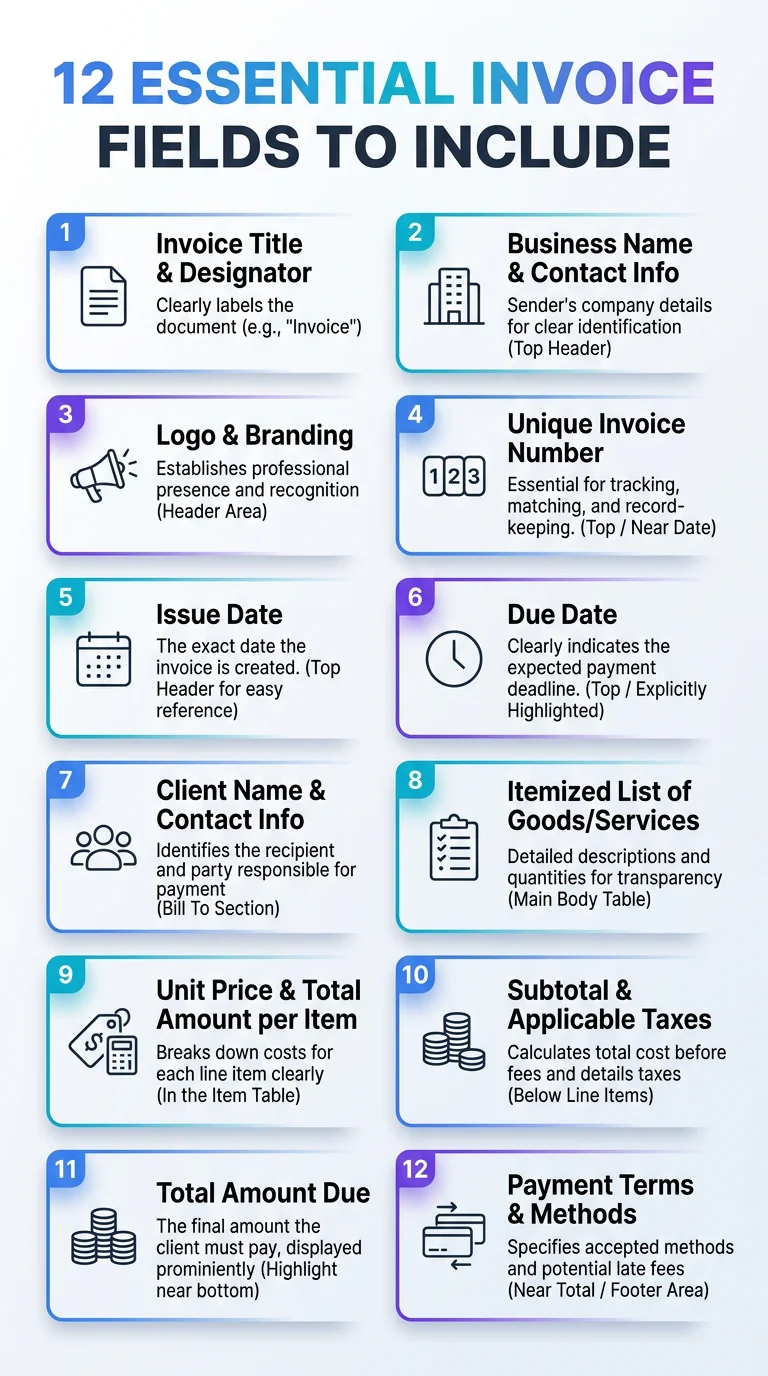
Illustrates the 12 essential invoice fields every invoice should include for clarity and faster payment.
What Should an Invoice Include? Field 1: Invoice Number
Every invoice needs a unique, sequential identifier. This is not optional.
Your invoice number is the anchor for every downstream process: your accounting records, the client's purchase order match, tax filing, and dispute resolution. Use a consistent format like INV-2026-001 and never skip or reuse a number.
- Keep numbers sequential with no gaps
- Include the year in the number for easy archiving
- Use a prefix that distinguishes invoice types (e.g., REC- for recurring, PRJ- for project-based)
- Never duplicate a number, even for a corrected document (issue a new number instead)
Fields 2 and 3: Invoice Date and Due Date
Two dates, two distinct jobs. The invoice date is when the document was issued. The due date is the payment deadline.
Leaving out the due date is one of the most common reasons clients pay late. Without a hard deadline on the document, "Net 30" lives only in your head, not theirs.
Standard terms are Net 15, Net 30, and Net 60. For smaller one-off invoices, "Due on Receipt" works well. See our payment terms best practices page for a breakdown of each option and when to use them.
What Should an Invoice Include for Seller and Buyer Identity? Fields 4 and 5
Your invoice needs to identify both parties clearly. No ambiguity, no missing details.
Field 4 is your business information:
- Your full legal business name or trading name
- Business address (physical or registered)
- Phone number and email address
- Tax registration number or VAT number (if applicable)
- Business logo (optional, but it improves professionalism)
Field 5 is your client's information:
- Client's full name or company name
- Billing address
- Client's email or contact reference
- Purchase order (PO) number if the client issued one
Missing the client's PO number on their own invoice is a guaranteed delay. Accounts payable teams match your invoice against their internal PO before approving payment. No match, no payment.
Field 6: A Clear Description of Work or Products
This field is where most invoices go vague. "Consulting services" tells a client nothing. "Brand strategy session (3 hours, April 14, 2026)" tells them everything.
Every line item description should answer three questions: what was delivered, when, and for which project or phase.
Vague descriptions slow down approvals because clients have to ask questions before they sign off. Specific descriptions get approved without a follow-up email.
Fields 7 and 8: Quantity and Unit Rate
List the quantity of each item or service separately from the unit price. Never combine them into a single lump figure.
Breaking these into two columns serves two purposes. First, it lets the client verify the math themselves. Second, it documents your pricing model explicitly, which matters for recurring billing and future quotes.
- Quantity: number of units, hours, days, or deliverables
- Unit rate: price per unit (hourly rate, day rate, unit cost)
- Line total: quantity multiplied by unit rate (auto-calculated in any decent template)
Every repeated field you type by hand is a moment you are not spending on actual work. Use a tool that calculates line totals automatically.
Field 9: Subtotal
The subtotal is the sum of all line item totals before tax or discounts are applied. It is a distinct row, not a merged total.
Showing the subtotal separately gives your client a clear audit trail. They see exactly what you charged for the work itself, separate from any government-mandated additions.
Fields 10 and 11: Discounts and Tax
Not every invoice has a discount. But every invoice should have a tax line, even if the rate is 0%.
Discounts (Field 10): Apply these after the subtotal and before tax. Show both the percentage and the dollar amount. "10% early-payment discount: -$50.00" is clear. "Discount: $50" raises questions.
Tax (Field 11): Show the tax rate and the calculated amount as separate values. "GST 10%: $45.00" is correct. Just "$45.00 tax" is not. Different jurisdictions, different auditors, and different clients all need to see the rate explicitly stated.
For freelancers working across borders, the tax field is especially critical. The geography of late payments reveals as much about regulatory environment as it does about payment culture, and a missing tax identifier is often a compliance failure, not just an oversight.
Field 12: Total Amount Due
This is the number that drives payment. It should be the largest, most prominent figure on the page.
A mobile-readable PDF with a clear total and a visible payment option converts faster than a cluttered spreadsheet printout. Make the total unmissable. Bold it. Increase the font size. Give it its own row with a clear label.
The total is: subtotal minus discount plus tax. Show the calculation path, then show the final figure prominently.
The Supporting Fields: Payment Instructions, Notes, and Banking Details
The 12 fields do not stop at the total. Three additional elements belong on every professional invoice to remove all friction from the payment process.
Payment methods accepted: List every way a client can pay you. Bank transfer, credit card, PayPal, Stripe, check. If they have to ask, you have slowed down payment.
Banking or payment details: For bank transfers, include your account name, account number, routing or sort code, and SWIFT/BIC for international payments. For digital payments, include your email or payment link directly on the document.
Notes or additional terms: Use this field for project-specific context, late fee policy, or a simple "thank you for your business." Keep it short. One or two lines maximum.
Our guide on sending invoices and getting paid faster covers how to pair these fields with smart delivery timing to cut payment cycles significantly.
What Should an Invoice Include vs. What Goes on a Receipt?
A quick distinction worth making. An invoice and a receipt are not the same document.
An invoice requests payment. It is sent before payment is received. A receipt confirms payment. It is issued after money changes hands.
The 12 fields described in this article apply to invoices. A receipt has a different structure, primarily showing payment method, amount received, and date of payment.
Confusing the two can create compliance issues, especially for VAT-registered businesses that need proper invoices on file for tax input claims. Read the full breakdown in our invoice vs receipt explainer.
What Should an Invoice Include When You Use a Template?
A well-designed invoice template locks all 12 fields into the right positions. You do not have to think about structure. You just fill in the data.
The key is choosing a template that includes every field by default, not one that makes you add rows manually for tax or discount. Our invoice template guide walks through layout choices, customizable columns, and branding options for different business types.
For freelancers with one-off invoices, a clean single-page template is ideal. For agencies billing across multiple projects in the same period, a multi-line template with project codes in the description column keeps books clean without extra documentation.
How AI-Driven Invoicing Gets All 12 Fields Right Every Single Time
In 2026, the defining shift for freelancers and small businesses is moving from manual data entry to AI-driven invoicing. That number of error-prone invoices, 39%, has held firm year after year because most teams have not made the switch yet.
Our Smart Fill workflow is the fastest way to go from zero to a sent invoice. Type or speak once, describe who you bill, the work, tax, and due date. The AI drafts all 12 fields, calculates totals in real time, and surfaces them in live preview before you generate the professional PDF.
Free users get 3 AI assists per day with no sign-up required. Professional and Business plans, starting at $14.99 and $29.99 per month, unlock unlimited AI drafts, bulk CSV processing, multi-client dashboards, and OCR scanning for imported documents.
Check the full features overview or compare tiers on our pricing page to find the right plan for your volume.
Conclusion
Knowing what should an invoice include is not just a bookkeeping formality. It is a direct driver of how fast you get paid and how clean your records stay.
The 12 fields that matter are: invoice number, invoice date, due date, your business information, client information, work or product description, quantity, unit rate, subtotal, discounts, tax, and total amount due. Add payment instructions and banking details, and you have a complete, professional document that requires no follow-up from either side.
Every field carries a job. Skip one and you create friction. Get all 12 right and payment moves on schedule.
Start building your next invoice now with our complete invoicing guide, or go straight to the generator and get a PDF in seconds.
Frequently Asked Questions
What should an invoice include to be legally valid?
A legally valid invoice must include your business name and address, the client's name and address, a unique invoice number, the invoice date, a description of goods or services, the total amount, and applicable tax details. Requirements vary by country, but these 12 fields cover the baseline for most jurisdictions in 2026.
What are the 12 fields that every invoice should have?
The 12 essential invoice fields are: invoice number, invoice date, due date, seller information, buyer information, line item descriptions, quantities, unit rates, subtotal, discount (if applicable), tax amount and rate, and the total amount due. Including payment instructions and banking details rounds out a complete, professional document.
Is a due date required on an invoice?
While not always a strict legal requirement, a due date is functionally essential. Without a specific due date, clients have no contractual deadline to meet, and late payments become far more common. Always include a due date or a clearly stated payment term like Net 30.
What happens if you send an invoice with missing fields?
A missing field, whether it is the tax rate, invoice number, or client PO reference, can cause accounts payable teams to reject or hold the invoice. This delays your payment by days or weeks. With 39% of invoices containing at least one error in 2026, completeness is the single most impactful thing you can control.
Should I include my bank details on every invoice?
Yes. Including your bank account details or payment link directly on the invoice eliminates the back-and-forth of clients asking how to pay you. The less friction between your invoice and their payment action, the faster money moves.
What is the difference between a subtotal and a total on an invoice?
The subtotal is the sum of all line items before tax and discounts are applied. The total is the final amount owed after tax is added and any discounts are subtracted. Both numbers should appear as separate, labeled rows so the client can verify the calculation without contacting you.
Can I create an invoice with all 12 fields without signing up?
Yes. Our free invoice generator lets you fill in all 12 fields, preview the document in real time, and download a professional PDF without creating an account. It is the fastest way to go from zero to a sent invoice for one-off jobs or first-time billing situations.
Ready to create your next invoice?
Use AI drafting on the homepage or sign up for a free account with cloud save and monthly plan limits.
Related articles
How QR Code Payments Are Bypassing Traditional Banking Delays in 2026
Discover how QR code payments are revolutionizing transactions in 2026, eliminating traditional banking delays and enhancing financial efficiency.
Professional Branding and Invoice Design Psychology: Why the Way You Bill Clients Determines Whether You Get Paid
Discover how professional branding and invoice design impact client payments. Learn the psychology behind effective billing to enhance your cash flow.
How to Choose Reliable Invoicing Software for Beginners: A Complete 2026 Guide
Discover essential tips for selecting reliable invoicing software in our comprehensive 2026 guide, tailored for beginners seeking efficiency and ease of use.
How to Send an Invoice: Email, WhatsApp, and Link-Sharing Explained for 2026
Learn the best practices for sending invoices in 2026. From email to WhatsApp and link-sharing, find out how to adapt to client preferences for quicker payments.