
Best AI-Driven Invoicing and Billing Automation Tools, Features, and Strategies for 2026
AI-driven invoicing and billing automation is no longer optional for teams that want to compete on speed and accuracy—and the numbers prove it: non-PO invoice total processing cycle time averages a painful 17.4 days at manual-maturity organizations, while best-in-class automated operations close the same invoices in just 5.1 days. If you're still typing invoice fields by hand, it's costing you more than time. It's costing you cash flow, client trust, and hours every single week that you will never recover.
Try it on your next invoice
Draft from text or voice, edit every field, and export a PDF—free on the homepage.
Try AI invoiceKey Takeaways
| Question | Answer |
|---|---|
| What is AI-driven invoicing and billing automation? | It is the use of artificial intelligence to handle the full invoice lifecycle—capture, OCR extraction, field validation, approval routing, and reconciliation—with minimal or zero manual data entry. |
| How much does manual invoice processing cost vs. automated? | Manual invoice processing costs between $12.88 and $19.83 per invoice, while AI-automated systems drop this to just $1.77–$3.18. |
| What features should I look for in AI invoicing software? | Look for AI drafting from text or voice, OCR extraction, editable draft review, bulk/CSV processing, multi-client workspaces, PDF template variety, and cloud storage. See the full eInvoice features breakdown for what each layer covers. |
| Is there a free AI invoicing tool I can try right now? | Yes. The eInvoice free plan lets you draft from text or voice, edit every field, and export a PDF—free on the homepage—with no credit card required. |
| What is the best AI invoicing option for high-volume businesses? | Bulk invoice generation via CSV/Excel combined with OCR processing is the practical standard for high-volume ops. The eInvoice bulk invoice generator handles hundreds of PDFs in a single run. |
| How does AI invoicing reduce late payments? | Faster invoice creation, automated reminders, and error-free field data remove the friction that delays approval on the client side—shortening the gap between delivery and payment. |
| What plans does eInvoice offer for billing automation? | Three tiers: Free (unlimited guest PDFs, monthly AI/OCR), Professional at $14.99/month (cloud, multi-client, OCR at scale), and Business at $29.99/month (unlimited volume and API). Full details on the eInvoice pricing page. |
Why AI-Driven Invoicing and Billing Automation Is the Practical Standard in 2026
AI invoice processing is no longer a future concept; it is the practical standard modern finance teams are adopting right now. The operational case is straightforward: every invoice your team processes manually carries direct labor cost, error risk, and a cycle-time penalty measured in days—not minutes.
Knowing how to create an invoice correctly is one of the most practical skills any freelancer, small business owner, or growing team can have. Yet the traditional answer—open a spreadsheet, type every field, re-check the math, save as PDF, email it out—is a workflow that AI has made completely obsolete.
Without a proper invoice, you are leaving yourself open to late payments, disputes, and cash flow problems. Upgrade to AI-driven invoicing to eliminate manual form filling, and you immediately cut overhead, reduce errors, and get paid faster. Here's exactly how to do it.
The Real Cost of Manual Billing (and What AI-Driven Invoicing Fixes)
Stop wasting time and money on manual invoicing! The cost isn't abstract. Manual invoice processing costs between $12.88 and $19.83 per invoice, while AI-automated systems drop this to just $1.77–$3.18. At even 50 invoices per month, that gap is $555–$910 in avoidable processing cost—every single month.
The cash flow angle is just as critical. Yet behind the headline figures lies a more complex picture: the median small business holds just 27 days of cash buffer, 49.4% fail within five years, and cash flow problems contribute to 82% of those failures. Slow invoicing is a direct contributor to that 27-day buffer shrinking further.
The fix is not a better spreadsheet template. It is end-to-end AI-driven billing automation that handles capture, extraction, validation, approval routing, and reconciliation without a human touching each field. That is the gap between 17.4-day cycle times and 5.1-day best-in-class performance.
Read the full breakdown of how AI-driven invoicing eliminates manual form filling for a deeper look at each stage of the workflow.
Did You Know?
Touchless (straight-through) processing rate for PO invoices sits at just 68.9% on average—while best-in-class organizations hit 96.3%. That 27-point gap is pure manual labor your team is absorbing every week.
Source: Medius AP Benchmarks
5 Core Features That Define AI-Driven Invoicing and Billing Automation Platforms
Not every tool calling itself "AI invoicing software" actually automates the full billing cycle. Here are the five features that separate genuine AI-driven billing automation from a digital form with a logo field.
- AI Drafting from Text or Voice. You describe the invoice in plain language—or dictate it—and the system populates vendor, dates, line items, quantities, rates, and totals automatically. This is the single highest-ROI capability for individual operators and small teams.
- OCR Extraction from PDFs and Images. Upload an existing invoice image or PDF, and the AI extracts every structured field into an editable draft. No retyping. No transcription errors. The eInvoice invoice OCR processing tool does exactly this at both individual and bulk scale.
- Editable Draft Review Before Export. Fully automated does not mean zero human oversight. The right workflow lets you review every AI-generated field, correct anomalies, and approve before the PDF is produced. This is the "AI + human confirmation" loop that finance teams actually trust.
- Bulk and Batch Processing. For teams invoicing dozens or hundreds of clients per cycle, CSV-to-PDF batch generation is non-negotiable. Upload your spreadsheet, map the columns, and generate hundreds of branded PDFs in a single run—consistent templates, zero manual repetition.
- Multi-Client Workspace and Dashboard. Agencies, consultants, and growing teams need client-level organization, not just a single invoice at a time. A proper dashboard tracks KPIs across clients, sends automated reminders, and keeps every billing relationship in one place.
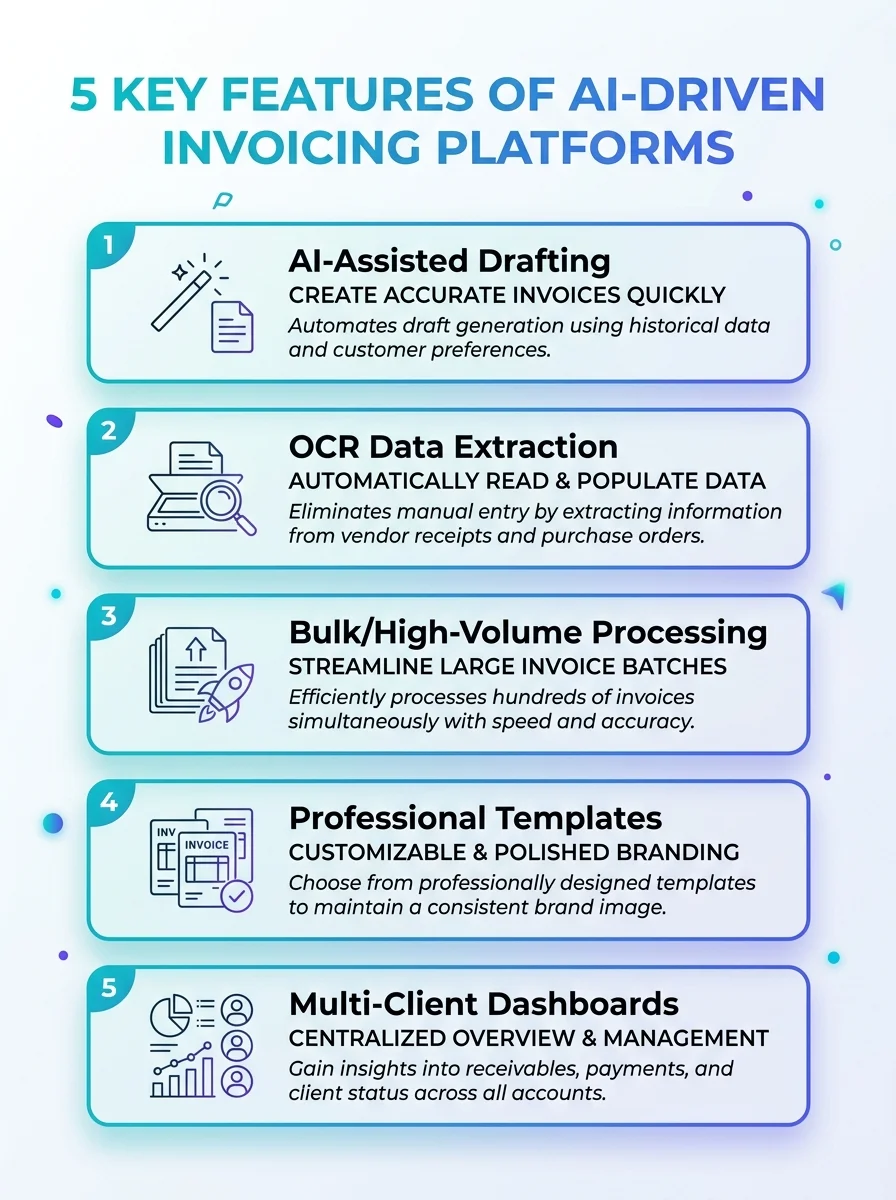 Explore how AI drives invoicing and billing automation. Learn about five essential features that streamline workflows and cut errors.
Best for Freelancers: AI-Driven Invoicing That Works Without an Accountant
Freelancers carry the invoicing burden alone. Every minute spent on manual billing is a minute not billed. That math gets ugly fast when you factor in average invoice prep time, email follow-up, and the inevitable "I didn't receive that invoice" conversation two weeks later.
Getting your invoicing process right is one of the simplest things you can do to get paid faster and keep your business running smoothly. For freelancers, the right AI invoicing setup needs three things: fast draft creation, professional-looking output, and a free entry point to test the flow before committing to a paid plan.
The eInvoice free plan covers all three. Draft from text or voice, edit every field, and export a PDF—free on the homepage. No subscription required to see what automated billing actually feels like on a real invoice. The 15+ professional PDF invoice templates include classic, modern, and branded designs with logo fields and QR pay support—so the output looks intentional, not like a rushed Google Doc.
Miss any of these—professional formatting, clear line items, accurate totals—and you risk delayed payments or client confusion. AI drafting removes that risk entirely because the fields populate correctly the first time.
Best for Small Businesses: Billing Automation That Scales with Your Client List
Small businesses face a compounding problem: client count grows, but the invoicing process doesn't scale with it. You're still opening individual files, copying last month's invoice, updating the date, changing the line items, re-saving, re-naming, re-exporting. That is overhead you are paying for in hours—every billing cycle.
AI-driven billing automation for small businesses needs to do more than generate a single PDF faster. It needs to handle multiple clients from one workspace, store invoice history in the cloud, and send reminders without a manual calendar entry for every follow-up.
The Professional plan at $14.99/month delivers exactly that: cloud storage, multi-client capabilities, and OCR processing at a scale that fits a growing client roster. The multi-client invoicing workspace lets you switch clients, reuse line items, and export individual PDFs without starting over each time.
For small businesses that read broader context on failure rates and cash dynamics, our full invoicing guide covers the end-to-end workflow from creation to collection.
Best for Agencies: AI-Driven Invoicing Across High-Volume, Multi-Client Billing Cycles
Agencies don't just have more clients—they have more complexity per client. Retainers, project milestones, hourly line items, reimbursable expenses. The combination means every invoice requires a different structure, yet the output needs to be consistently professional and on-brand.
Standard invoice tools break under this pressure. AI-driven invoicing and billing automation for agencies has to handle batch output, per-client customization, and reliable branding at every touchpoint. That means CSV uploads mapped to invoice fields, bulk PDF generation, and ZIP export for the full batch—not one-by-one file management.
For teams managing dozens of clients per billing cycle, the Business plan at $29.99/month includes unlimited volume and API access. That means you can integrate AI-driven billing automation directly into your existing workflow stack—not just use it as a standalone web tool. Check the current plan comparison for the full feature breakdown between Professional and Business tiers.
Best for High-Volume Operations: Bulk AI Invoicing and OCR at Scale
High-volume AP and billing operations have a different problem than freelancers or small agencies. The issue isn't that invoices are hard to create. The issue is that thousands of vendor invoices arrive in inconsistent formats—PDFs, scanned images, emailed attachments—and every one of them needs to be captured, extracted, validated, and routed before a human can even review it.
OCR extraction is the entry point for that automation chain. Upload the PDF or image, let AI extract vendor details, line items, dates, and totals into a structured editable draft, and the downstream approval and reconciliation workflow can actually function at speed. Without reliable capture, no amount of routing logic or approval automation delivers consistent results.
The eInvoice invoice OCR processing tool handles this at both individual and batch scale, with Professional and Business plans supporting bulk OCR runs. Pair that with the bulk invoice generator for outbound billing, and you have a complete inbound-plus-outbound automation loop.
Did You Know?
More than half of finance leaders—54.2%—say their finance processes are only partially automated in 2026, directly exposing their organizations to increased fraud risk and control gaps.
Source: Rossum Document Automation Trends 2026
How to Choose the Right AI-Driven Invoicing and Billing Automation Platform
The market for AI invoicing tools in 2026 is crowded. Most products offer a basic template builder with a "generate PDF" button and call it automation. That is not automation—it is a faster version of the same manual process. Here is exactly how to evaluate whether a platform delivers genuine AI-driven billing automation.
- Does it draft from natural language or voice? If the input still requires you to type every field manually, AI is cosmetic—not functional.
- Does it extract data from existing invoices via OCR? Inbound invoice capture is where most AP time is lost. A platform without OCR extraction forces your team to re-enter data from vendor invoices by hand.
- Can you review and edit the AI draft before export? Blind automation is a fraud and error risk. The right system surfaces the AI draft, flags anomalies, and lets a human confirm before the PDF is finalized.
- Does it support batch/bulk processing? Single-invoice tools do not scale. If your volume grows, you need CSV/Excel-to-PDF batch generation without proportional labor growth.
- What does the free plan actually include? Any serious platform lets you test the AI drafting flow before you pay. If you can't try it on your next invoice without a credit card, the free plan is marketing copy—not a real test.
- Are plans priced proportionally to value? A $14.99 Professional plan covering cloud, multi-client, and OCR is a different proposition than a $50+ tool with the same features. Run the cost-per-invoice math before committing.
If you're early in evaluating options, the 2026 guide to choosing reliable invoicing software walks through every evaluation criterion in plain terms.
AI-Driven Invoicing Pricing: What Automation Actually Costs in 2026
Cost is the most common objection to adopting AI billing automation—and it almost always evaporates once you run the per-invoice comparison honestly.
Manual invoice processing costs between $12.88 and $19.83 per invoice. At 100 invoices per month, that is $1,288–$1,983 in direct processing cost every month. AI-automated systems bring that figure down to $1.77–$3.18 per invoice—a reduction that makes even a $29.99/month platform pay for itself before invoice number two.
| Plan | Monthly Cost | Key Features | Best For |
|---|---|---|---|
| Free | $0 | Unlimited guest PDFs, monthly AI/OCR credits, AI drafting from text or voice | Freelancers, testing the workflow |
| Professional | $14.99 | Cloud storage, multi-client workspace, OCR at scale, reminders, dashboard | Small businesses, growing client lists |
| Business | $29.99 | Unlimited volume, API access, bulk CSV processing, full automation stack | Agencies, high-volume AP operations |
Try it on your next invoice—free plan, no credit card, full AI drafting flow. If the output saves you 20 minutes on the first invoice, the math on upgrading writes itself.
The Approval Bottleneck: The AI-Driven Billing Automation Step Most Teams Miss
Most teams focus AI automation efforts on invoice creation and capture—and miss the bottleneck that kills cycle time: approval wait time. In organizations without automated approval workflows, approval delays account for 35%–45% of total invoice cycle time. Best-in-class organizations using automated routing, escalation rules, and mobile approval flows bring that share under 20%.
The practical implication is direct. Even if your OCR extraction is flawless and your AI drafting is instant, a 3-day approval queue sitting in someone's email inbox adds days to every invoice cycle. Automated routing—rules that push invoices to the right approver immediately, escalate when stuck, and confirm via mobile—is the second layer of billing automation that most teams skip because they assume "AI invoicing" means only the creation side.
Full AI-driven billing automation covers both sides: creation-and-capture automation upstream, plus routing-and-approval automation downstream. Miss the second layer, and you're running a faster car on a congested road.
Conclusion: AI-Driven Invoicing and Billing Automation Is the Competitive Baseline for 2026
We aggregated data from the Avalara/Cebr Global E-Invoicing Economic Impact Study, The Business Research Company, the European Commission VAT Gap Report, the AFP 2025 Benchmark, IMARC Group, Vertex, and dozens of other primary sources. The conclusion across all of them is consistent: AI-driven invoicing and billing automation is the competitive baseline—not an advantage—for any business processing more than a handful of invoices per month in 2026.
The cost gap is real: $12.88–$19.83 manual versus $1.77–$3.18 automated, per invoice. The cycle time gap is real: 17.4 days average versus 5.1 days best-in-class. The cash flow risk is real: 27 days of buffer is the median small business runway, and slow invoicing directly erodes it.
Upgrade to AI-driven invoicing to eliminate manual form filling, and you immediately cut overhead, reduce errors, and get paid faster. Start with the free plan—draft from text or voice, edit every field, export a PDF—free on the homepage. Test it on one invoice today. The operational case for scaling up from there is one billing cycle long.
Frequently Asked Questions
What is the difference between AI-driven invoicing and regular invoice software?
Regular invoice software gives you a form to fill in manually. AI-driven invoicing and billing automation actually drafts the invoice for you from natural language or voice input, extracts data from existing documents via OCR, validates fields, and routes approvals—reducing or eliminating manual data entry at every stage. The operational difference is measured in hours per week and dollars per invoice.
Is AI-driven invoicing and billing automation worth it for a small business in 2026?
Yes, and the math is straightforward. Manual processing costs $12.88–$19.83 per invoice; AI-automated billing drops that to $1.77–$3.18. Even at 20 invoices per month, the savings outpace the cost of a Professional plan ($14.99/month) in the first billing cycle. The faster cycle times also directly reduce the cash flow gap that causes 82% of small business failures.
How does AI invoice OCR processing actually work?
You upload an invoice image or PDF, and the AI uses optical character recognition combined with machine learning to identify and extract structured fields—vendor name, invoice number, dates, line items, quantities, unit prices, and totals—into an editable draft. You review the draft, correct any anomalies, and export your own clean PDF. The eInvoice invoice OCR tool handles this at both individual and bulk scale.
Can AI billing automation handle invoices for multiple clients at once?
Yes. Multi-client AI invoicing workspaces let you manage separate client profiles, reuse saved line items, switch between clients without rebuilding invoices from scratch, and export individual PDFs or a full ZIP batch. This is specifically designed for agencies and freelancers managing multiple active billing relationships simultaneously.
What is touchless invoice processing, and how does AI-driven automation improve it?
Touchless processing means an invoice moves from receipt through capture, validation, coding, and approval without any manual intervention—straight-through with zero human touches. The current average touchless rate for PO invoices is 68.9%; best-in-class automated organizations reach 96.3%. AI-driven billing automation improves touchless rates by making the extraction, validation, and routing steps reliable enough to run without manual correction on standard invoices.
How do I start using AI-driven invoicing automation without paying upfront?
The eInvoice free plan gives you full access to AI drafting from text or voice, editing every field, and exporting a professional PDF—with no credit card required. It is designed specifically so you can run a real invoice through the automated workflow before deciding whether to upgrade to Professional or Business tier features like cloud storage, OCR scale, and bulk processing.
What approval workflow features should AI-driven invoicing platforms include?
Approval wait time accounts for 35%–45% of total invoice cycle time in organizations without automated workflows. A complete AI-driven billing automation platform should include automated routing to the right approver, escalation rules for invoices that stall, mobile approval options, and KPI tracking so you can measure how approval time is trending. Without these features, AI extraction gains are offset by manual approval bottlenecks downstream.
Ready to create your next invoice?
Use AI drafting on the homepage or sign up for a free account with cloud save and monthly plan limits.
Related articles
We'are Listed on
How to Invoice as a Freelance Writer: What to Include and How to Bill for Writing Projects
Discover essential tips on invoicing as a freelance writer. Learn what to include and how to effectively bill for your writing projects.
How to Send an Invoice Email (2026 Best Practices for Getting Paid Faster)
Learn how to send effective invoice emails in 2026. Improve deliverability, automate reminders, and enhance your billing process for quicker payments.
Can AI check an invoice before sending? Can it detect missing fields, duplicates, incorrect totals, unusual amounts?
Discover how AI can enhance your invoicing process by detecting errors, duplicates, and unusual amounts before sending. Streamline your billing cycle today.