
How to Use AI to Generate Invoices from Voice: The Complete 2026 Guide
Speaking speed averages 150 words per minute compared to typing at just 40 words per minute, which means using AI to generate invoices from voice is 3.75x faster than manual data entry before you even factor in auto-fill, validation, and instant PDF export. AI-powered invoice automation has matured to the point where describing a job out loud produces a ready-to-send invoice in seconds, and in 2026 that workflow is no longer experimental — it is the practical standard modern finance teams are adopting right now.
Try it on your next invoice
Draft from text or voice, edit every field, and export a PDF—free on the homepage.
Try AI invoiceKey Takeaways
| Question | Quick Answer |
|---|---|
| Can AI really generate an invoice from voice input? | Yes. Modern AI tools convert spoken descriptions into structured invoice drafts with line items, totals, and client details auto-filled. |
| What do I need to get started? | A browser and a microphone. No registration required on eInvoice to try voice drafting free. |
| How accurate is voice-to-invoice AI? | High accuracy on names, amounts, and dates — but always verify the preview before exporting your PDF. |
| Can I use voice to generate invoices for multiple clients? | Yes. Multi-client sessions let you switch clients, reuse line items, and batch-export all PDFs in one go. |
| Does voice input replace the review step? | No. AI drafts the invoice; you inspect the preview, edit any field, then export. Review always comes before sending. |
| Is this faster than filling in a template manually? | Significantly. Voice dictation is 3.75x faster than typing, and AI auto-fills the fields you would otherwise enter one by one. |
| What happens after the AI generates the invoice draft? | You verify every field in a live invoice preview, make edits, then export a professional PDF — all in one session. |
Why Voice-to-Invoice Is the Practical Standard in 2026
Manual invoicing is a bottleneck that costs time and introduces errors at every step. The problems stack up fast:
- Typing client names, addresses, and line items from memory or scattered notes
- Forgetting a service line and sending an incomplete invoice
- Miscalculating totals when adding items manually
- Reformatting the same invoice layout for every new client
- Re-entering the same data into accounting software to reconcile payments
When you use AI to generate invoices from voice, every single one of these problems goes away. You describe the job out loud, the AI structures it, and you export a finished PDF after a quick review.
Unlike traditional invoice software that relies entirely on manual input, an AI invoice generator actively assists by suggesting invoice details, auto-filling fields, generating line item descriptions, and detecting missing information before the invoice is sent. That shift from passive form to active assistant is the core of what makes voice-to-invoice so powerful in 2026.
How to Use AI to Generate Invoices from Voice: Step-by-Step
The full workflow takes under two minutes once you know the steps. Here is exactly how it works:
- Open the AI invoice tool. Navigate to the invoice generator. No registration required to start.
- Activate voice input. Click the microphone icon in the AI drafting field. Your browser will request microphone permission once.
- Dictate your invoice details. Speak naturally: client name, service descriptions, quantities, rates, due date, and any notes. Example: "Invoice for Acme Corp, web design services, 12 hours at $95 per hour, due in 30 days."
- Let AI extract and auto-fill. The system processes your voice, maps each spoken element to the correct invoice field, and generates a structured draft with line items, subtotals, tax, and total calculated.
- Inspect the preview. Review every field in the live invoice preview. Edit anything that needs adjustment — rates, dates, line item wording.
- Export your PDF. Hit export. A professional, ready-to-send PDF invoice downloads instantly.
Draft from text or voice, edit every field, and export a PDF — free on the homepage. That is the complete loop, and it replaces what used to take 20-plus minutes of manual form filling.
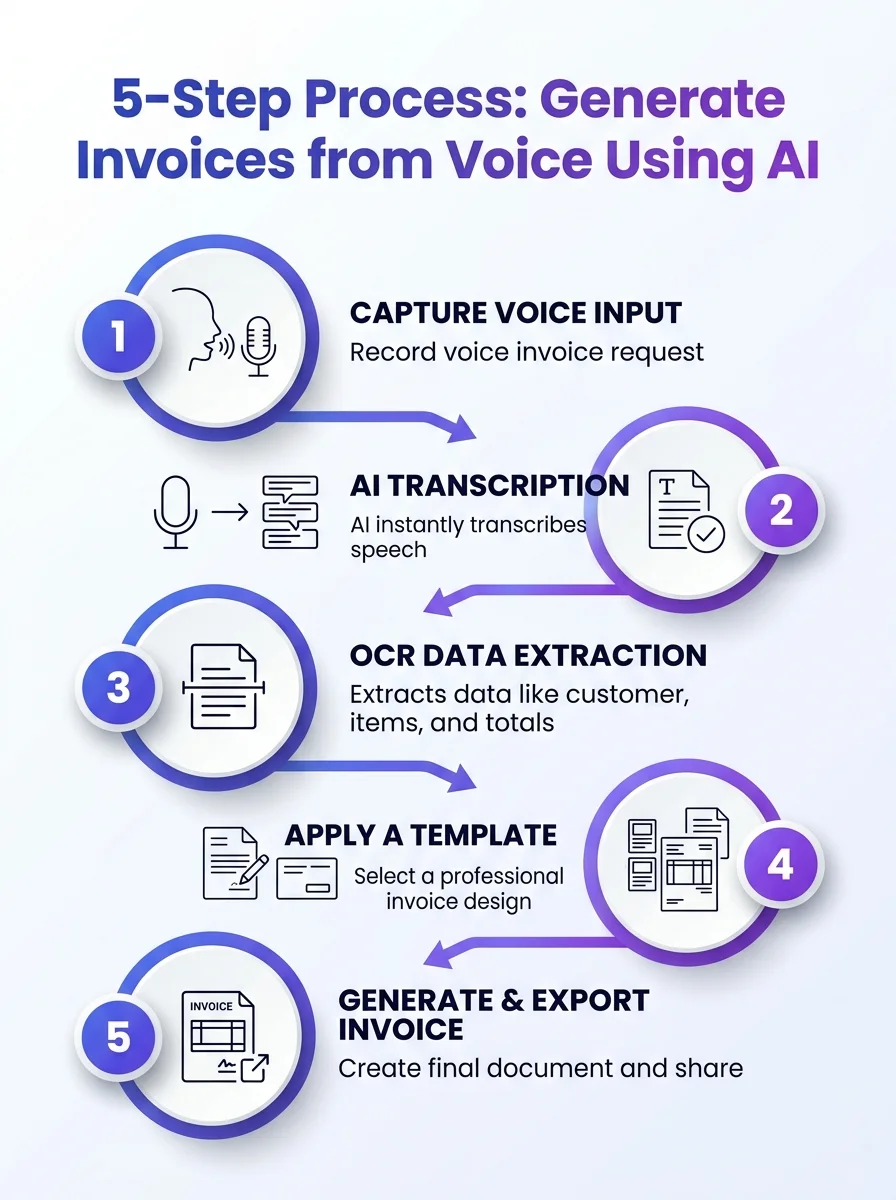 A visual guide showing a 5-step AI-driven workflow to turn voice input into ready-to-send invoices. Learn how AI can streamline invoicing from spoken data.
What Happens Inside the AI When You Generate Invoices from Voice
Understanding the underlying process helps you get better results from your voice inputs. The AI is doing several things simultaneously the moment you finish speaking:
- Natural language parsing: The model identifies entities in your speech — company names, dollar amounts, service descriptions, time periods, and payment terms.
- Field mapping: Each identified entity routes to the correct invoice field. "Due in 30 days" becomes a calculated due date. "12 hours at $95" populates quantity, unit price, and line total automatically.
- Completeness check: The AI flags any fields that appear missing or ambiguous before you reach the preview stage, so you are not sending an invoice with a blank billing address.
- Template application: We adhere to our template — the AI fills your chosen professional layout, not a plain text dump.
- Calculation verification: Subtotals, tax lines, and grand totals recalculate in real time as the draft populates.
As businesses adopt more automated processes, these capabilities can also be part of broader AI solutions designed to streamline repetitive business operations and workflows.
This is the capture-to-draft lifecycle compressed into seconds. You provide the raw information verbally; AI handles the structure, math, and formatting.
Did You Know?
61% of late invoice payments in the U.S. are caused by simple manual errors that AI automation can eliminate.
Source: SoftCo
Best Features to Look for When Using AI to Generate Invoices from Voice
Not all AI invoice tools handle voice input with the same precision. Here is what separates a genuinely useful voice-to-invoice workflow from a basic dictation tool that still requires heavy manual cleanup:
| Feature | Why It Matters for Voice Invoicing |
|---|---|
| Smart Fill / AI auto-fill | Maps spoken data to the right fields without you clicking each one manually |
| Live preview | See the formatted invoice as it builds, so verification is instant |
| Editable draft fields | Every field must be adjustable post-voice-input — no locked AI output |
| Professional PDF templates | Voice draft populates a polished layout, not a plain text file |
| Multi-client support | Switch clients in one session without re-entering your own business info |
| OCR fallback | Lets you scan existing invoices when voice isn't the right input for a particular document |
| No registration required | Eliminates friction so you can generate and export immediately |
The full feature set at eInvoice covers every item in that list, including 15-plus professional PDF templates and a dashboard built for repeatable billing operations.
How to Use AI to Generate Invoices from Voice for Multiple Clients
If you bill more than one client per week, the voice workflow scales directly. Here is how a multi-client voice invoicing session runs in 2026:
- Open the multi-client invoicing workspace.
- Dictate your first invoice by voice. Review and confirm the draft.
- Switch to the next client profile. Your business details and template carry forward automatically.
- Dictate the second invoice. Reuse any line items from the previous session to save even more time.
- Repeat for all clients in the session, then download all PDFs together.
This approach eliminates re-entering your company name, address, and payment terms for each client. The AI retains context across the session, so your voice input stays focused on the client-specific details — what was done, how much, when it is due.
Reduce manual work from 8 hours to just 30 minutes weekly and boost efficiency. That is the real-world outcome when you combine voice input with multi-client session management and eliminate manual form filling entirely.
Voice Invoicing vs. Manual Entry vs. OCR Scanning: When to Use Each
AI gives you three distinct input modes, and choosing the right one per situation is how you maximize speed without sacrificing accuracy.
| Scenario | Best Input Method | Why |
|---|---|---|
| Creating a new invoice from memory or notes | Voice | 3.75x faster than typing; natural language maps to fields automatically |
| Recreating or reformatting an existing invoice | OCR Scan | Upload the PDF or image, let AI extract vendor, dates, and line items instantly |
| Complex invoices with many custom fields | Manual + AI assist | Type directly with Smart Fill suggestions; AI fills what it can as you go |
| Generating invoices for hundreds of clients at once | Bulk CSV | Generate hundreds of invoices in seconds via the bulk invoice generator |
The invoice OCR tool keeps the workflow simple: upload a document, let AI read the data, then verify the result in a familiar invoice preview. Voice and OCR are complementary input modes, not competing ones.
Did You Know?
Speaking speed averages 150 words per minute compared to typing at just 40 words per minute, making voice-to-invoice data entry 3.75x faster than manual input.
Source: Cloudflight
How Accurate Is AI at Generating Invoices from Voice Input?
Accuracy depends on three factors: the clarity of your spoken input, the AI model's natural language processing capability, and whether you verify before exporting.
In practical terms, well-spoken invoice dictation with clear amounts, client names, and service descriptions produces highly accurate drafts. The AI handles numerical parsing well — "twelve hours at ninety-five dollars" reliably becomes a line item showing 12 x $95.00 = $1,140.00.
Where you should always verify:
- Proper nouns — unusual company names or street addresses may need minor correction
- Homophones in amounts — "four" vs "for" in specific phrasing contexts
- Tax rates — confirm the correct rate was applied if your jurisdiction has specific requirements
- Due date math — verify the calculated date aligns with your actual payment terms
This is why the verify step is non-negotiable in the workflow. AI generates the draft; you inspect the preview. That combination is what delivers both speed and Data Accuracy in the final PDF.
How to Use AI to Generate Invoices from Voice: Best Practices for Clean Results
These habits consistently produce better voice-to-invoice drafts with fewer edits needed:
- Lead with the client name. Stating the recipient first helps the AI anchor the rest of your dictation to the correct invoice context.
- Speak amounts clearly and completely. Say "ninety-five dollars per hour" rather than "ninety-five per." The AI fills quantity from context but performs better with full phrasing.
- Group related line items together. Dictate all labor items, then all materials, then notes. Structured speech produces a more logically ordered invoice.
- State payment terms explicitly. "Net 30" or "due in 14 days" translates directly into the due date field.
- Always review the preview before exporting. Verification is the final quality gate — it takes 30 seconds and eliminates the errors that cause late payments.
- Use saved templates for recurring client types. A freelance invoice template or consulting invoice template keeps your layout consistent across all voice-generated invoices.
AI invoice processing is no longer a future concept; it is the practical standard modern finance teams are adopting right now. Building clean voice-input habits from day one means faster drafts and fewer revisions every single time.
Getting Started: Plans and Pricing for Voice-to-Invoice Generation
You do not need a paid plan to try voice-based invoice generation. The free tier on the pricing page includes unlimited guest PDF exports and a monthly taste of AI drafting and OCR, so you can run the full voice-to-invoice workflow before committing to any plan.
For teams billing multiple clients regularly, the Professional and Business plans remove usage limits and add dashboard tracking, client management, payment reminders, and bulk CSV exports. The product walkthrough video covers every feature tier in under five minutes if you want to see the full workflow before choosing a plan.
Invoice OCR processing is included in-plan at no additional cost — meaning you can generate invoices from voice and scan existing documents without purchasing separate tools.
Conclusion
Learning how to use AI to generate invoices from voice is one of the highest-leverage billing improvements available to freelancers, contractors, and finance teams in 2026. The workflow is simple: speak your invoice details, let AI structure and auto-fill the draft, inspect the live preview, then export a professional PDF. No manual form filling. No calculation errors. No inbox time wasted reformatting the same layout for the fifteenth client this month.
The combination of voice input, Smart Fill, live preview, and verified PDF export reduces manual work from 8 hours to just 30 minutes weekly for teams that switch to AI-powered invoice automation. Ready to Scale Your Invoicing? Start with a single voice-generated invoice on the homepage today — No registration required.
Frequently Asked Questions
Can I really use AI to generate invoices from voice without any setup?
Yes. On eInvoice, no registration is required to use the voice drafting feature. Open the invoice generator in your browser, enable your microphone when prompted, and start dictating. Your first AI-generated invoice from voice can be exported as a PDF within two minutes.
How do I dictate invoice line items using voice AI?
Speak naturally and include quantity, description, and rate in sequence — for example, "website redesign, 20 hours at $120 per hour." The AI parses each element and maps it to the correct line item fields, calculating the subtotal automatically. Review the line items in the preview before exporting.
Is voice-to-invoice AI accurate enough for professional invoices in 2026?
Accuracy is high for clearly spoken amounts, standard service descriptions, and common payment terms. The verification step in the live preview catches any edge-case errors before the invoice leaves your hands, making the combined workflow reliable for professional use.
What is the fastest way to generate invoices from voice for multiple clients?
Use the multi-client invoicing workspace. Dictate each client's invoice in sequence, with your business details and chosen template persisting across the session. Switch clients, verify each preview, and export all PDFs at once. This eliminates repetitive re-entry and is the fastest workflow for high-volume voice invoicing.
Can AI generate invoices from voice notes recorded on my phone?
The most streamlined approach is to dictate directly in the browser tool where the AI processes speech in real time. If you have a pre-recorded voice note, you can transcribe it first and paste the text into the AI drafting field, which produces the same structured invoice output using text input instead of live voice.
Does AI voice invoicing work for contractors and freelancers specifically?
Absolutely. Contractors and freelancers benefit most from voice invoicing because they often invoice from job sites, vehicles, or between client meetings where typing is impractical. Specialized templates like the contractor invoice template mean the AI fills a layout already formatted for project-based billing.
How is generating invoices from voice different from just using a dictation app?
A dictation app converts speech to raw text — you still have to copy that text into an invoice form and fill every field manually. An AI invoice generator from voice goes further by parsing the dictated content, mapping amounts and descriptions to the correct invoice fields, calculating totals, and producing a formatted invoice draft ready for review and PDF export.
Ready to create your next invoice?
Use AI drafting on the homepage or sign up for a free account with cloud save and monthly plan limits.
Related articles
We'are Listed on
How to Invoice as a Freelance Writer: What to Include and How to Bill for Writing Projects
Discover essential tips on invoicing as a freelance writer. Learn what to include and how to effectively bill for your writing projects.
How to Send an Invoice Email (2026 Best Practices for Getting Paid Faster)
Learn how to send effective invoice emails in 2026. Improve deliverability, automate reminders, and enhance your billing process for quicker payments.
Can AI check an invoice before sending? Can it detect missing fields, duplicates, incorrect totals, unusual amounts?
Discover how AI can enhance your invoicing process by detecting errors, duplicates, and unusual amounts before sending. Streamline your billing cycle today.