
Best Professional Invoice Templates for Freelance Designers in 2026
Finding the best professional invoice templates for freelance designers is not a cosmetic decision — it is a cash-flow decision. Nearly 39% of all manual invoices contain at least one error, and for freelance designers billing across multiple projects and clients, a single mistake on a poorly structured template is all a client needs to delay payment by weeks.
Try it on your next invoice
Draft from text or voice, edit every field, and export a PDF—free on the homepage.
Try AI invoiceKey Takeaways
| Question | Answer |
|---|---|
| What are the best invoice templates for freelance designers? | Templates that include branded sections, project scope line items, milestone breakdowns, payment terms, and QR pay links. eInvoice offers 15+ professional PDF designs built for exactly this workflow. |
| Are there free professional invoice templates for designers? | Yes. eInvoice's free plan gives you unlimited guest PDFs with no account required, right in your browser, with no software to install. |
| What should a freelance designer invoice include? | Business logo, client details, project description, itemized hours or deliverables, payment due date, late fee clause, and a payment link. The best professional invoice templates for freelance designers have all of these pre-built. |
| How much do professional invoice templates cost? | eInvoice offers a free tier, a Professional plan at $14.99/month, and a Business plan at $29.99/month. |
| Can I use one template across multiple design clients? | Yes. eInvoice's multi-client invoicing feature lets you pick a template once and generate per-client PDFs, then download them all as a single ZIP file. |
| Do AI invoice tools work for freelance designers? | AI-assisted invoicing is now the standard for freelancers and small business teams who want to move fast without sacrificing accuracy. |
| What is the fastest way to create a professional invoice as a designer? | Use a platform with live preview, auto-fill fields, and one-click PDF export. eInvoice lets you create and customize invoices online in minutes, right in your browser. |
Why Freelance Designers Need Professional Invoice Templates (Not Just Any Template)
A Word document or a basic spreadsheet is not a professional invoice template — it is a liability. Design clients are visual people; a badly formatted invoice signals that your business is disorganized, and disorganized businesses get paid last.
Beyond aesthetics, the best professional invoice templates for freelance designers are built around the specific billing realities of design work: project-based scopes, milestone payments, revision rounds, and hourly rates that often sit across multiple line items. A generic template cannot accommodate that without manual patching — and manual patching is where errors enter the invoice lifecycle.
The practical standard in 2026 is an AI-powered template system that auto-fills fields, validates totals in real time, and exports a clean PDF with zero reformatting required. That is the workflow professional designers are adopting now.
What Makes the Best Professional Invoice Templates for Freelance Designers
Not every template marketed to creatives is actually built for the way designers bill. The distinguishing features separate a genuinely useful design invoice template from one that merely looks good in a screenshot.
- Dedicated project scope sections: Line items that support descriptions like "Brand Identity Phase 1," "Logo Revision Round 2," or "Motion Graphics — 30-second cut" without breaking the layout.
- Logo and branding integration: The ability to upload your own logo and apply brand colors, so the invoice visually matches your design studio identity.
- QR payment links: Built-in QR codes that let clients pay without needing to copy-paste bank details or navigate a separate portal.
- Live preview before export: Real-time rendering so you can review totals and terms before the PDF is generated and sent.
- Late fee and payment terms sections: Pre-built fields for net-30, net-15, or custom due dates, plus optional late fee language that sets legal expectations upfront.
- Milestone and deposit support: The ability to split a project invoice into deposit, mid-project, and final-delivery stages without creating three separate documents.
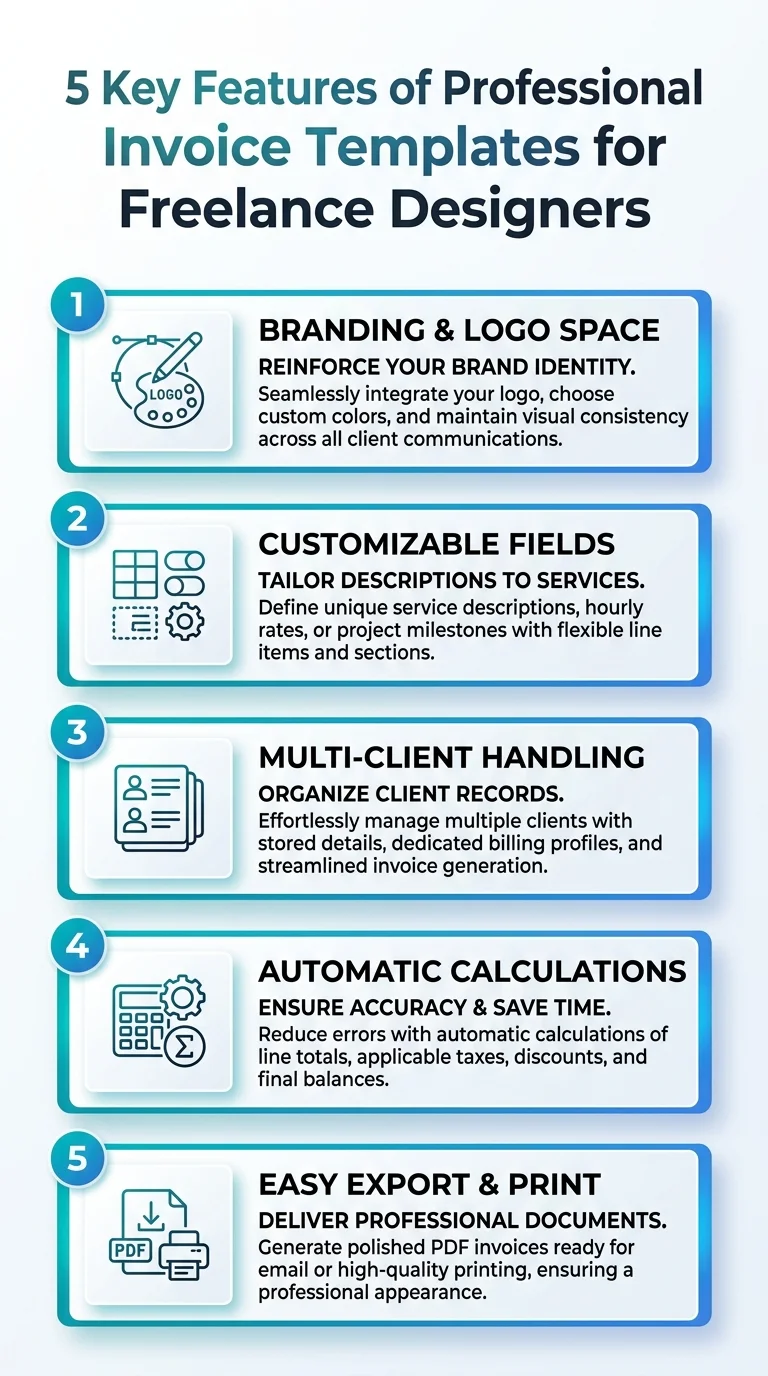
This infographic highlights the top 5 features of professional invoice templates that freelancers in design should use.
Best Professional Invoice Templates for Freelance Designers: The Full Template Lineup
eInvoice offers 15+ professional PDF designs built and curated for freelance professionals. For freelance designers specifically, four templates stand out based on workflow fit, visual hierarchy, and client-facing presentation.
Modern Split Template
The Modern Split Template is engineered for high readability — clean columns, strong typographic contrast, and a layout that makes itemized design work easy for clients to parse at a glance.
It is the go-to choice for UI/UX designers, brand consultants, and digital product studios who need their invoices to feel as refined as their deliverables.
Creative Theme
The Creative Theme prioritizes prominent branding elements. Your logo sits at the focal point, color accents follow your studio's palette, and the overall layout communicates that this is a creative business, not a generic vendor.
Graphic designers, illustrators, and motion designers working with consumer brands will find this template makes the strongest first impression at the billing stage.
Classic Template
The Classic Template is a traditional layout designed for corporate or agency clients who expect formality. When a freelance designer is billing a legal firm, a financial services company, or a Fortune 500 marketing team, the Classic Template reads as immediately credible.
It keeps precision front and center: all totals, tax lines, and terms are clearly delineated with no visual noise to distract from the numbers.
Freelance-Specific Layout
This is the most operationally accurate template for project-based design work. It includes dedicated sections for project scopes, milestones, and hourly rates — all the line-item structures that generic business templates fail to accommodate.
If you bill across discovery phases, design sprints, and revision rounds, the Freelance-Specific Layout is built for exactly that invoice lifecycle, without requiring you to hack a standard template to fit.
You can browse and preview all of these designs on the eInvoice invoice templates page, then create a PDF free with no account required.
How Professional Invoice Templates Protect Your Cash Flow as a Freelance Designer
85% of freelancers experience late payments at least some of the time. That statistic is not about bad clients — it is largely about bad invoices. Unclear payment terms, missing due dates, and unprofessional formatting give clients the friction they need to deprioritize your payment.
Did You Know?
85% of freelancers experience late payments at least some of the time.
Source: MediaPost / Remote
The best professional invoice templates for freelance designers address this directly. When your invoice includes explicit net-30 or net-15 terms, a late fee clause, and a QR code that removes all payment friction, the client has no procedural excuse to delay.
The human cost — the hours spent writing follow-up emails, making uncomfortable calls, and waiting — is harder to quantify but just as real. A professional template does not guarantee on-time payment, but it removes every structural barrier that creates late payment in the first place.
Unlike traditional invoice software that relies entirely on manual input, an AI invoice generator actively assists by suggesting invoice details, auto-filling fields, generating line item descriptions, and detecting missing information before the invoice is sent. That is the difference between a template that looks professional and a system that keeps your invoices accurate and complete across every billing cycle.
Best Professional Invoice Templates for Freelance Designers: Pricing Breakdown
One of the most common questions freelance designers ask is whether professional invoice tools are worth the monthly spend. The answer is a numbers question, not an opinion question.
Manual invoice processing costs a business between $12.88 and $19.83 per invoice in labor and time. For a freelancer sending 10 invoices per month, that is up to $198 in hidden labor cost every single month — time you cannot bill to a client.
| Plan | Price | Best For | Key Features |
|---|---|---|---|
| Free | $0 | Designers just starting out or with occasional billing needs | Unlimited guest PDFs, monthly AI/OCR access, saves up to 10 invoices |
| Professional | $14.99/month | Active freelance designers billing multiple clients monthly | Full cloud dashboard, WhatsApp delivery, bulk invoicing, full AI features |
| Business | $29.99/month | Design studios or high-volume freelancers with multi-client automation needs | Unlimited volume, API access, batch PDF and ZIP export |
The free plan is genuinely functional — you can export a PDF immediately, right in your browser, with no software to install and no credit card required. The Professional plan at $14.99/month is where the full invoice lifecycle automation kicks in for designers billing regularly.
You can review the full plan comparison on the eInvoice pricing page.
Multi-Client Invoicing for Freelance Designers Juggling Multiple Projects
Most freelance designers are not billing one client at a time. A typical month might include a branding project, a web design retainer, a motion graphics one-off, and an in-progress logo package. That is four separate invoices, four separate PDFs, and four separate opportunities for formatting inconsistency.
eInvoice's multi-client invoice generator solves this with a single-template, multi-output workflow. You set your business profile and template once, then generate individual PDFs per client. All of them download as a single ZIP file — no repetitive data entry, no reformatting, no version control headaches.
This is what separates intelligent invoice processing from older rule-based automation that broke whenever a vendor changed their invoice layout. The multi-client system keeps your template consistent across every client while letting per-client details vary exactly where they need to.
AI-Powered Features Inside Professional Invoice Templates for Freelance Designers
AI invoice processing is no longer a future concept; it is the practical standard modern finance teams are adopting right now — and freelance designers are no exception. The question is not whether to use AI-assisted invoicing, but which platform implements it in a way that actually reduces your workload.
Did You Know?
21% of freelancers are paid late, or not at all, more than half the time.
Source: Remote State of Freelance
The eInvoice AI invoice generator actively assists by suggesting invoice details, auto-filling fields, generating line item descriptions, and detecting missing information before the invoice is sent. That last step — catching errors before the PDF goes out — is the one most freelancers undervalue until a client disputes a total and payment stalls.
The platform also uses OCR to ingest data from multiple sources, so if you are working from a project brief, a contract scope, or a previous invoice, those details can populate the new template without manual retyping. The result is a complete, reviewed, and validated invoice in minutes rather than the 30 to 60 minutes a manual process consumes.
Tools like the eInvoice AI Invoice Generator let you create and customize invoices online in minutes, right in your browser, with no software to install — and you have complete control over your data with export and deletion capabilities.
Security and Data Control for Freelance Designers Using Invoice Templates
Freelance designers handle client contracts, project budgets, and business financial data on every invoice they send. That data needs to be served with advanced security measures, not stored in a spreadsheet on a personal drive or emailed as an unencrypted attachment.
eInvoice applies AES-256-GCM encryption to stored invoice data. Your business profile, client details, and billing history are yours — the platform gives you full export and deletion capabilities so you remain in control of your own financial records at every stage of the invoice lifecycle.
This is not a compliance checkbox. For freelance designers who bill agency clients or corporate procurement teams, demonstrating that your invoicing system handles data with enterprise-grade controls is part of being taken seriously as a professional vendor.
Step-by-Step: How to Create a Professional Invoice as a Freelance Designer
Creating a professional invoice in eInvoice takes fewer steps than most designers expect. Here is the exact workflow:
- Go to eInvoice in your browser — no download, no installation. The invoice generator loads immediately.
- Select your template — choose from the Modern Split, Creative Theme, Classic, or Freelance-Specific Layout based on your client type.
- Upload your logo and set brand colors — this takes 60 seconds and makes the invoice immediately identifiable as yours.
- Add your client's details — name, company, address, and contact. If you have invoiced this client before, auto-fill fields populate the repeat data.
- Add your line items — project scope, deliverable descriptions, hours, rates, or flat fees. The AI assists by suggesting line item descriptions and flagging incomplete fields.
- Set payment terms — due date, late fee clause, and your preferred payment method or QR pay link.
- Review totals and terms in live preview — confirm everything is accurate before generating the PDF.
- Export a PDF — download immediately or send directly via email or WhatsApp on the Professional plan.
That is the complete invoice lifecycle from blank template to sent document, with no reformatting, no version control, and no manual error-checking required.
The Best Professional Invoice Templates for Freelance Designers Are Not Optional in 2026
The best professional invoice templates for freelance designers do more than look good — they reduce errors, protect cash flow, set legal payment expectations, and represent your brand accurately to every client you bill. In 2026, the practical standard is an AI-assisted platform with designer-specific templates, live preview, and one-click PDF export.
eInvoice delivers all of that across a free plan and two paid tiers starting at $14.99/month, with 15+ professional PDF designs built for the specific billing realities of design work. Whether you are billing one client or managing a full roster with the multi-client batch export, the best professional invoice templates for freelance designers are already there, ready to use, right in your browser.
Start with the free plan, pick a template, and see the difference a purpose-built design invoice makes the first time you send it.
Frequently Asked Questions
What is the best invoice template format for freelance designers in 2026?
The best professional invoice templates for freelance designers in 2026 are PDF-based templates with branded sections, project scope line items, milestone fields, and built-in payment term clauses. Platforms like eInvoice offer 15+ designs specifically structured for design billing workflows, with live preview and AI-assisted field completion before export.
Is a free invoice template good enough for a professional freelance designer?
A free template can work for occasional billing, but a professional invoice template built for design work — with logo integration, milestone sections, and QR payment links — pays for itself by reducing late payments and cutting the time spent creating each invoice. eInvoice's free plan covers basic PDF generation; the Professional plan at $14.99/month unlocks the full AI-assisted workflow.
How do I make an invoice look professional as a freelance graphic designer?
Use a template that includes your logo, a clean line-item structure for project deliverables, explicit payment terms, and a QR code or payment link. The best professional invoice templates for freelance designers handle all of this structurally, so you are not manually formatting a Word document every time you need to bill a client.
What should I charge on a freelance design invoice?
Your invoice should itemize every billable element: project scope fees, revision rounds, hourly rates for additional work, licensing fees, and any expenses incurred. Professional invoice templates for freelance designers include pre-built line-item sections that accommodate all of these billing types without requiring you to hack a generic layout.
Can I use one invoice template for multiple design clients?
Yes, and you should. Platforms like eInvoice support multi-client invoicing where you select one template and generate individual PDFs per client, then download them all as a single ZIP. This is the most efficient approach for freelance designers managing multiple active projects simultaneously.
Do professional invoice templates for designers include late fee clauses?
The best professional invoice templates for freelance designers include dedicated payment terms sections where you can specify net-30, net-15, or custom due dates alongside optional late fee language. This sets legal expectations before the invoice is sent, which is the most effective structural defense against late payment.
Is AI invoice generation worth it for a solo freelance designer?
Yes. AI-assisted invoicing reduces manual work from hours to minutes weekly, catches errors before PDFs go out, and auto-fills repeating client details so you are not re-entering the same data invoice after invoice. For a solo designer billing 5 to 15 clients per month, that time saving is billable hours recovered, not an added expense.
Ready to create your next invoice?
Use AI drafting on the homepage or sign up for a free account with cloud save and monthly plan limits.
Related articles
7 Freelance Invoice Mistakes That Delay Payment
Missing purchase orders, vague line items, and weak due dates slow payment. Fix these seven habits before your next send.
We'are Listed on
How to Invoice as a Freelance Writer: What to Include and How to Bill for Writing Projects
Discover essential tips on invoicing as a freelance writer. Learn what to include and how to effectively bill for your writing projects.
Digital Payment Statistics (2026): 65+ Data Points on Market Size, Wallets, BNPL, and the Future of Money
Explore the latest digital payment statistics for 2026, featuring 65+ data points on market size, wallets, BNPL, and the evolving future of money