
Top 10 Modern Billing Features Independent Contractors Actually Need in 2026
Automated payment reminders alone get businesses paid an average of 11 to 14 days faster and reduce late payments by 25 to 30% — and that's just one of the top 10 modern billing features for independent contractors that separates contractors who get paid on time from those chasing invoices for weeks. If your current billing setup is built on copy-paste, spreadsheets, or manual form filling, every single job you complete carries unnecessary financial risk.
Try it on your next invoice
Draft from text or voice, edit every field, and export a PDF—free on the homepage.
Try AI invoiceKey Takeaways
| Feature | Why It Matters for Contractors |
|---|---|
| AI Invoice Generation | Targets 99.9% accuracy; eliminates manual form filling errors |
| Bulk CSV-to-PDF Processing | Converts hundreds of CSV rows into PDFs in seconds, not hours |
| Multi-Client Management | Switch between clients, reuse line items, batch export PDFs per client |
| Automated Payment Reminders | Cuts late payments by 25 to 30% without manual follow-up |
| Invoice OCR Processing | Extracts line items, dates, and totals from scanned PDFs automatically |
| Sequential Invoice Numbering | Prevents accounting chaos from duplicate or skipped identifiers |
| Professional Templates | 15+ layouts with logo, QR pay links, and live preview built in |
Quick answer: The top 10 modern billing features for independent contractors in 2026 include AI invoice generation, bulk CSV processing, multi-client management, automated reminders, OCR extraction, sequential numbering, professional templates, voice-activated input, tax compliance fields, and live error preview. Together, they remove the manual friction that costs contractors time and cash flow.
Feature 1: AI-Powered Invoice Generation (Best for Accuracy)
Manual form filling carries a biological error floor of 1 to 4% per entry. On a 50-line invoice with four fields per line, that's potentially eight errors before you even hit send.
AI invoicing targets 99.9% accuracy based on your input data. You describe the job in plain text or via voice, and the system auto-populates every field, including client name, line items, quantities, rates, tax, and totals.
That is not a rounding-error problem or a sector-specific quirk. It's a structural flaw in human data entry that AI eliminates by design. Independent contractors billing across multiple projects per week cannot afford that error rate stacking up.
Tools like eInvoice apply AI generation to your inputs so the output is compliant and complete every time, not just most of the time.
Feature 2: Bulk CSV-to-PDF Processing (Best for High-Volume Contractors)
Converting hundreds or thousands of CSV rows into professional, accurate invoices doesn't have to mean hours of copy-paste work. That's the core premise behind bulk invoice generation, and it changes everything for contractors managing multiple jobs simultaneously.
You upload once, map your fields, and download a ZIP of PDFs in seconds. No reformatting. No individual file creation. No data re-entry between your project management tool and your billing system.
The bulk invoice generator handles CSV and Excel uploads with automatic column mapping to eliminate the guesswork. Each row becomes a branded, client-ready PDF.
- Upload CSV or Excel files with unlimited rows
- Automatic mapping ensures precision across all fields
- Batch export delivers a single ZIP with individual PDFs per invoice
- OCR support for processing existing scanned documents
For contractors billing 20, 50, or 200 clients per month, this is the feature that ends the bottleneck.
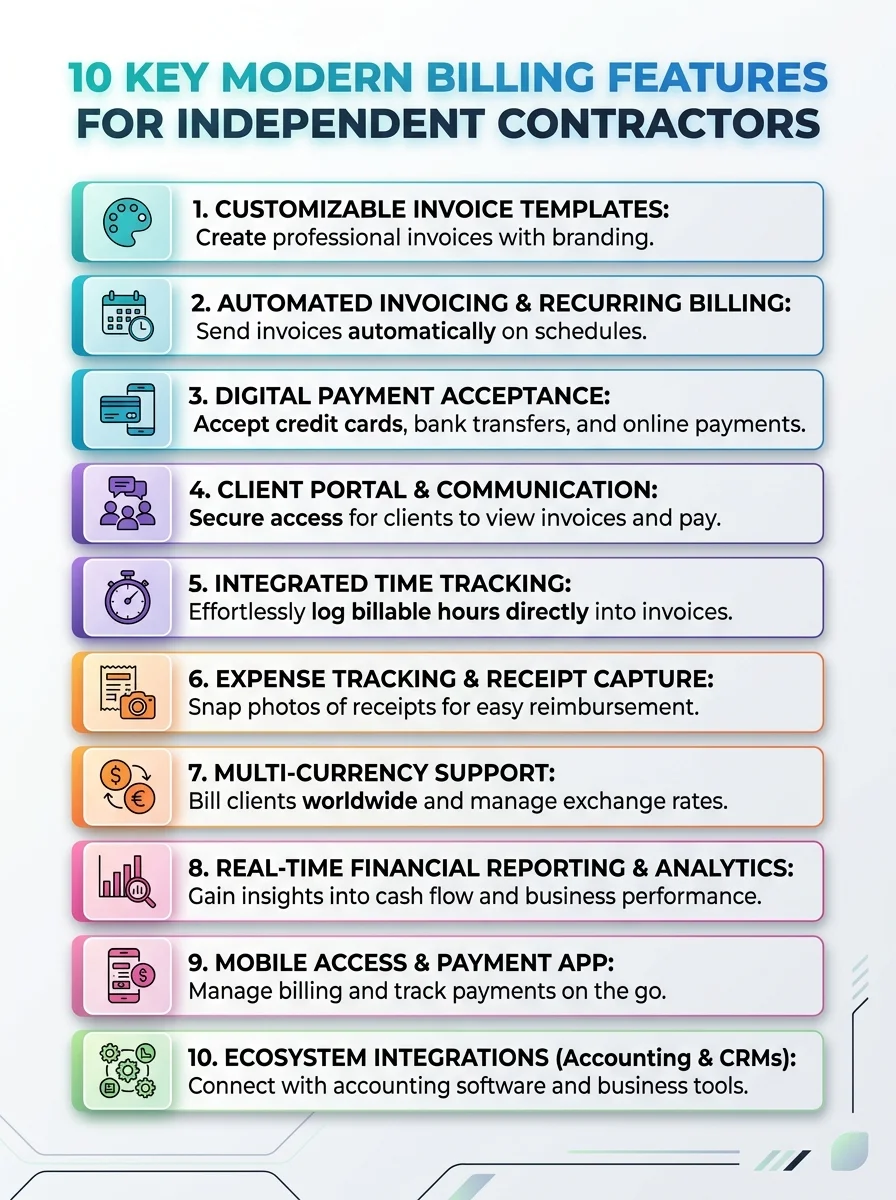 Discover the top 10 modern billing features that help independent contractors streamline invoicing and get paid faster. See how these features boost efficiency.
Feature 3: Multi-Client Invoice Management (Best for Freelancers with Diverse Rosters)
Most independent contractors don't have one client. They have five, twelve, or thirty. Each client has different rates, different line items, different payment terms. Managing that in a single spreadsheet is how accounting chaos starts.
Multi-client invoicing lets you switch between clients, reuse line items, and batch export PDFs for each bill without rebuilding from scratch every time.
Did You Know?
Automated payment reminders get businesses paid an average of 11 to 14 days faster and reduce late payments by 25 to 30%.
Source: Invoicemonk 2026
The multi-client invoice solution uses data mapping to reduce errors when pulling client-specific fields. It scales with your workload instead of against it.
The result: you spend less time on administrative setup per client and more time on billable work. That is the only kind of efficiency that actually moves your cash flow forward.
Feature 4: Automated Payment Reminders (Best for Eliminating Late Payments)
That delay compounds. A single rejected invoice can push a 30-day payment into a 60-day payment. Add a missed reminder on top of that, and you're operating at 90 days before you realize there's a problem.
Automated reminders fire on schedule without you lifting a finger. The client gets notified at 7 days, 3 days, due date, and overdue intervals automatically.
For independent contractors, this is non-negotiable. You're not a collections department. You have actual work to do. The billing system should handle the follow-up while you handle the deliverables.
Combined with the 11 to 14 day faster payment data, the math is straightforward: automated reminders are not a convenience feature. They are a cash flow instrument.
Feature 5: Invoice OCR Processing (Best for Digitizing Paper Records)
You worked the job. The client handed you a paper receipt or a scanned PDF from their system. Now you need to reconcile it against your invoice. That manual re-entry process is where data entry errors breed fastest.
Invoice OCR processing eliminates that entirely. Upload an invoice image or PDF, and AI extracts vendor data, dates, line items, and totals into an editable draft. Then you export your own clean PDF.
- Handles scanned images, photographed receipts, and existing PDFs
- Extracts vendor name, invoice date, due date, and all line items
- Outputs an editable draft, not a locked file
- Eliminates manual re-entry from third-party billing formats
For contractors who receive client purchase orders in varying formats, OCR support is what prevents a documentation backlog from turning into a billing chaos problem.
Feature 6: The 12 Non-Negotiable Invoice Fields (Best for Compliance)
Knowing what should an invoice include sounds simple, but 39% of all invoices contain at least one error. Miss even one field, and you're chasing the client for a corrected document.
Modern billing tools enforce what we call the 12 non-negotiable fields standard: contractor name, contact details, client name, client address, invoice number, issue date, due date, line item descriptions, quantities, unit rates, subtotal, tax line, and total due.
A blank tax line signals an oversight. An explicit 0% signals intentional compliance. That distinction matters when your client's accounts payable team processes hundreds of invoices per month. Yours should not be the one that triggers a query.
"Knowing what should an invoice include sounds simple, but 39% of all invoices contain at least one error." —
eInvoiceGenerator
A compliant invoice structure is a prerequisite for every other billing feature to function correctly. No template, no automation, and no reminder system fixes a structurally incomplete document.
Feature 7: Sequential Invoice Numbering (Best for Audit-Ready Records)
Never reuse numbers. Duplicates cause accounting chaos. It sounds obvious until you're manually numbering your twelfth invoice of the week at 11 PM and accidentally reuse INV-0034.
Sequential identifiers are auto-generated in modern billing systems. Each invoice gets a unique, non-repeating number assigned at creation. No human involvement. No possibility of collision.
This matters beyond just organization. When your accountant, your client's AP team, or a tax authority needs to audit your billing history, sequential numbering is the backbone of traceability. Skip it, and you're creating problems that compound across financial years.
The invoice templates available in 2026 include auto-incrementing number fields as a default, not an add-on. That's the correct approach.
Feature 8: Professional Invoice Templates with Live Preview (Best for Brand Consistency)
15+ layouts with logo placement, QR pay links, and live preview support give contractors direct control over how their billing documents look before they send a single PDF.
Live preview is the feature that changes behavior. When you can see exactly what the client will receive in real time, you catch formatting errors, missing fields, and layout issues before export. No surprises. No corrected versions.
QR pay links embedded in templates reduce payment friction significantly. The client scans, pays, and your outstanding balance clears without a follow-up email ever being written.
- 15+ professional PDF designs across industries
- Logo upload and brand color customization
- QR payment link integration
- Live preview before final PDF export
- Layouts suitable for service, product, retainer, and project billing
Feature 9: Voice-Activated Invoice Creation (Best for Field Contractors)
You're on a job site. Your hands are occupied. You complete a task, and you need to log it for billing immediately before the details blur. Opening a spreadsheet is not an option.
Voice-activated invoicing solves this directly. Describe the job in plain text or speak it aloud, and the system generates a structured invoice draft with the correct fields populated. No keyboard. No manual form filling. No biological error floor compounding across fifteen voice-logged entries.
This is particularly relevant for contractors in construction, landscaping, maintenance, and field services where the gap between completing work and billing for it costs real money.
Did You Know?
39% of all invoices contain at least one error — and each error creates a potential delay, dispute, or rejection that pushes your payment cycle backward.
Source: eInvoiceGenerator — What Should an Invoice Include
The faster you log a completed job, the faster the invoice reaches the client. The faster the invoice reaches the client, the sooner the payment clock starts. Voice-activated input compresses that gap to near zero.
Feature 10: Tiered Pricing That Scales with Contractor Volume (Best for Cost Control)
Modern billing features should not require enterprise-level pricing for independent contractors operating at small to mid scale. The right structure is one that starts free, stays functional, and scales only when your volume demands it.
The current pricing structure reflects this directly:
| Plan | Price | What's Included |
|---|---|---|
| Free | $0 | Unlimited manual PDFs, AI assists |
| Professional | $14.99/mo | Bulk generation, OCR processing, full templates |
| Business | $29.99/mo | Full bulk, OCR, dashboards, multi-client workflows |
Starting free with unlimited manual PDFs and AI assists means you can verify the system works for your billing workflow before committing a dollar. That's the correct risk structure for independent contractors.
The jump from Free to Professional at $14.99 unlocks the bulk and OCR features, which is where the real time savings begin for contractors billing more than a handful of clients per month.
How These Modern Billing Features Connect to Faster Cash Flow
Each feature in isolation adds marginal value. Combined, they close the loop between completing work and receiving payment with near zero administrative delay.
The pipeline looks like this:
- Job completes. Voice input captures it immediately.
- AI generates a compliant invoice with all 12 non-negotiable fields populated.
- Sequential identifier assigns a unique invoice number automatically.
- Live preview confirms accuracy before export.
- PDF delivers to the client with a QR pay link embedded.
- Automated reminders fire at scheduled intervals until payment clears.
- Bulk processing handles the next 50 invoices while you're on the next job.
That is not a workflow that requires a bookkeeper, an accountant on retainer, or three hours of administrative time each week. It's a billing system that runs on structure, not effort.
The bulk invoice solution is built specifically to scale this pipeline for contractors whose volume makes manual processing a genuine cash flow bottleneck.
All In All
The top 10 modern billing features for independent contractors in 2026 are not optional upgrades. They are the difference between a cash flow problem and a billing system that works without you babysitting it.
Manual form filling with its 1 to 4% biological error floor, untracked payment cycles, and hours of copy-paste work is a structural disadvantage. AI invoicing, bulk CSV processing, OCR extraction, automated reminders, and sequential numbering replace that disadvantage with a system that is accurate, compliant, and fast.
If you're still building invoices one field at a time, the modern billing features for independent contractors covered above represent a direct path to fewer errors, faster payments, and less administrative chaos every single billing cycle.
Frequently Asked Questions
What are the most important modern billing features for independent contractors in 2026?
The most important modern billing features for independent contractors are AI invoice generation, automated payment reminders, bulk CSV-to-PDF processing, sequential invoice numbering, and invoice OCR. Together, these eliminate manual data entry errors and compress the time between completing work and receiving payment.
How does AI invoicing reduce errors for freelancers and contractors?
AI invoicing targets 99.9% accuracy by auto-populating all required fields from your plain-text or voice input, removing the 1 to 4% biological error floor that affects every manual entry. It enforces the 12 non-negotiable invoice fields by default so nothing gets missed before the PDF reaches your client.
Is bulk invoice generation worth it for a solo contractor or small freelancer?
Yes, if you bill more than 10 to 15 clients per month. Converting hundreds of CSV rows into individual client-ready PDFs in seconds eliminates what would otherwise be hours of manual copy-paste work. At $14.99/month on the Professional plan, the time savings pay for the tool on the first billing cycle alone.
What happens if I miss a field on a contractor invoice?
Miss even one non-negotiable field, and you're chasing the client for a corrected document, which can push a 30-day payment into a 60-day payment. Modern billing tools with live preview and AI field enforcement prevent that by flagging incomplete invoices before export, not after the client rejects them.
What is invoice OCR processing and why do independent contractors need it?
Invoice OCR processing uses AI to extract vendor names, dates, line items, and totals from scanned PDFs or photographed receipts into an editable draft. Independent contractors who receive purchase orders or expense documents in varying formats use OCR to eliminate manual re-entry and the data entry errors that come with it.
How do automated payment reminders work for contractor billing?
Automated reminders send scheduled notifications to clients at preset intervals, such as 7 days before due, on the due date, and at overdue intervals, without any manual action from the contractor. In 2026, this feature alone reduces late payments by 25 to 30% and gets contractors paid 11 to 14 days faster on average.
What is the best free invoicing tool for independent contractors in 2026?
eInvoiceGenerator offers a Free plan with unlimited manual PDFs and AI assists at $0, making it a strong starting point for contractors who want to test modern billing features before committing to a paid tier. The Professional plan at $14.99/month unlocks bulk processing and OCR for contractors with higher volume needs.
Ready to create your next invoice?
Use AI drafting on the homepage or sign up for a free account with cloud save and monthly plan limits.
Related articles
We'are Listed on
How to Invoice as a Freelance Writer: What to Include and How to Bill for Writing Projects
Discover essential tips on invoicing as a freelance writer. Learn what to include and how to effectively bill for your writing projects.
How to Send an Invoice Email (2026 Best Practices for Getting Paid Faster)
Learn how to send effective invoice emails in 2026. Improve deliverability, automate reminders, and enhance your billing process for quicker payments.
Can AI check an invoice before sending? Can it detect missing fields, duplicates, incorrect totals, unusual amounts?
Discover how AI can enhance your invoicing process by detecting errors, duplicates, and unusual amounts before sending. Streamline your billing cycle today.